For seven weeks on this module, we have worked in controlled environments. First the p5.js web editor, then your local VSCodium setup. You have written code that executes immediately, predictably, within systems designed to protect you from your own mistakes. Variables hold values. Functions abstract complexity. Loops repeat reliably. Events respond when triggered. Everything happens within safe boundaries.
This week, we leave that safety. We enter the command line: a text interface where you type instructions and the system executes them without confirmation, without undo, without metaphor. When you type rm file.txt, the file is gone. Permanently. No trash bin. No “are you sure?” The system trusts you to know what you are doing.
But the command line is not just about technical control. It is about who gets to command, what commanding means, and how automation through scripts becomes labour elimination. The linguistic metaphor is revealing: you command the machine. The machine obeys. This relation encodes particular assumptions about power, agency, and the proper relationship between humans and computational systems.
Nick Dyer-Witheford analyses what he calls the “cybernetic offensive”: capital’s ongoing drive to overcome human labour through three strategies.
First, elimination of human labour through automation.
Second, cheapening of human labour through global supply chains and networked logistics.
Evasion of human labour through financialisation and algorithmic systems.
When you write a bash script that automates a sequence of commands, you are participating in the first strategy. You are eliminating labour. Maybe your own repetitive work (potentially liberatory). Maybe someone else’s job (displacement, unemployment, precarity). Scripts are crystallised labour: accumulated knowledge encoded as commands, ready to execute without human involvement. They do not tire, do not make mistakes (if written correctly), do not demand wages, do not organise, do not strike. This is the fantasy of frictionless automation: pure execution without human complexity, resistance, or cost.
But whose labour? And what are the consequences? These questions structure everything that follows.
Before we touch the terminal, let’s consider these questions:
Think about tasks you perform repeatedly on your computer. Which ones could be automated through scripts? Whose labour would that automation eliminate? Your own, or someone else’s?
The command line trusts you with power. Graphical interfaces add friction (confirmation dialogues, trash bins, undo) between intention and action. Which interface assumptions do you prefer? Which do you think you should prefer? Are those the same?
Consider the phrase “commanding a computer.” What does that linguistic metaphor reveal? What other metaphors could we use for human-computer interaction? How would different metaphors change what seems natural or possible?
When algorithms automate managerial decisions (assigning tasks, monitoring performance, evaluating workers), who is commanding whom? Can a system “command” if it has no agency? Or is it always humans commanding through systems?
Time-sharing systems in the 1960s gave multiple users access to one expensive computer through terminals and command lines. Cloud computing gives millions of users access to centralised infrastructure through interfaces and APIs. What has changed? What has stayed the same? Who benefits from centralisation?
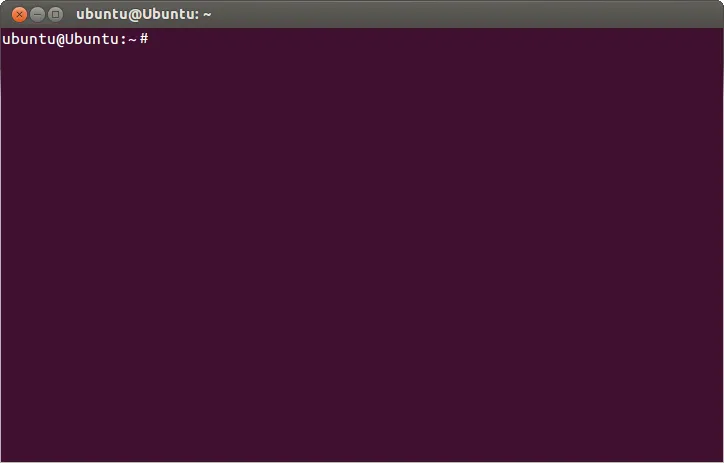
Open your terminal in your CC0 Ubuntu VM through VirtualBox. You see a prompt, a cursor blinking, waiting. This is your shell: a program that reads text you type, interprets it as commands, executes those commands by communicating with the operating system kernel, and displays results.
Your Ubuntu system uses Bash (Bourne Again Shell). A shell is nothing mysterious. It is a program running a loop:
1
while true:
2
display prompt
3
read user input
4
parse input into command and arguments
5
execute command
6
display output
That is all a shell does. But that simple loop enables direct control of your system. When you type ls, the shell calls the ls program, which calls system functions to read directory contents, formats the output, and displays it. When you type rm file.txt, the shell calls rm, which tells the kernel to remove the file’s directory entry and mark its storage space as available. The actual data might persist until overwritten, but it is inaccessible without forensic tools. One command, one keystroke, permanent consequence.
Compare this to graphical interfaces. When you drag a file to the trash, here is what happens: the file is moved to a special .Trash directory, an icon animates, a confirmation dialogue might appear, the file remains recoverable until you explicitly “empty trash,” which triggers another confirmation, which finally performs deletion with visual feedback. Every step adds friction. Every layer assumes you might not know what you are doing, might make mistakes, might need protection from your own actions.
Alexander Galloway (an author I keep referring to a lot on this module, critical and theoretical writings on the digital), in The Interface Effect (2012), argues that interfaces are never neutral windows onto computation. They are ideological constructs encoding assumptions about users, about control, about proper relations between humans and systems. The GUI encodes: users are potentially dangerous to themselves, need guidance through processes, benefit from visual metaphors (files as documents, trash as waste bins), value safety over efficiency, want reversibility. The command line encodes: users are competent technical actors, value efficiency over safety, want direct access without mediation, can handle permanent consequences, do not need metaphors but prefer literal operations.
Neither is neutral. Both reflect particular ideas about who computers are for, what relationship users should have with systems, who is trusted with power. The command line historically privileged those with institutional access (universities, corporations, military), technical training, cultural capital that correlates with race, gender, class. This was not always deliberate exclusion, but accumulated barriers: access to machines, documentation, education, time to learn, cultural permission to identify as “technical.” These barriers structure who has infrastructure literacy, who can command systems directly, who depends on mediated interfaces designed by others.
But the command line is also site of resistance. Artists, activists, hackers use terminals as expressive medium precisely because they enable direct system access, automation, control that GUIs restrict. ASCII art emerged because early terminals only displayed text. Livecoding makes terminals performance spaces. Computational poetry uses command-line text processing tools. Hundred Rabbits creates art and tools in minimalist computing environments powered by solar panels, using command lines because they are efficient, require minimal resources, run on anything. Technical infrastructure is always cultural infrastructure. The command line can be repurposed, queered, made strange, used against intended purposes.
In your terminal, type these one at a time. Press Enter after each. Make mistakes. Read error messages. That is how you learn.
Terminal window
1
pwd
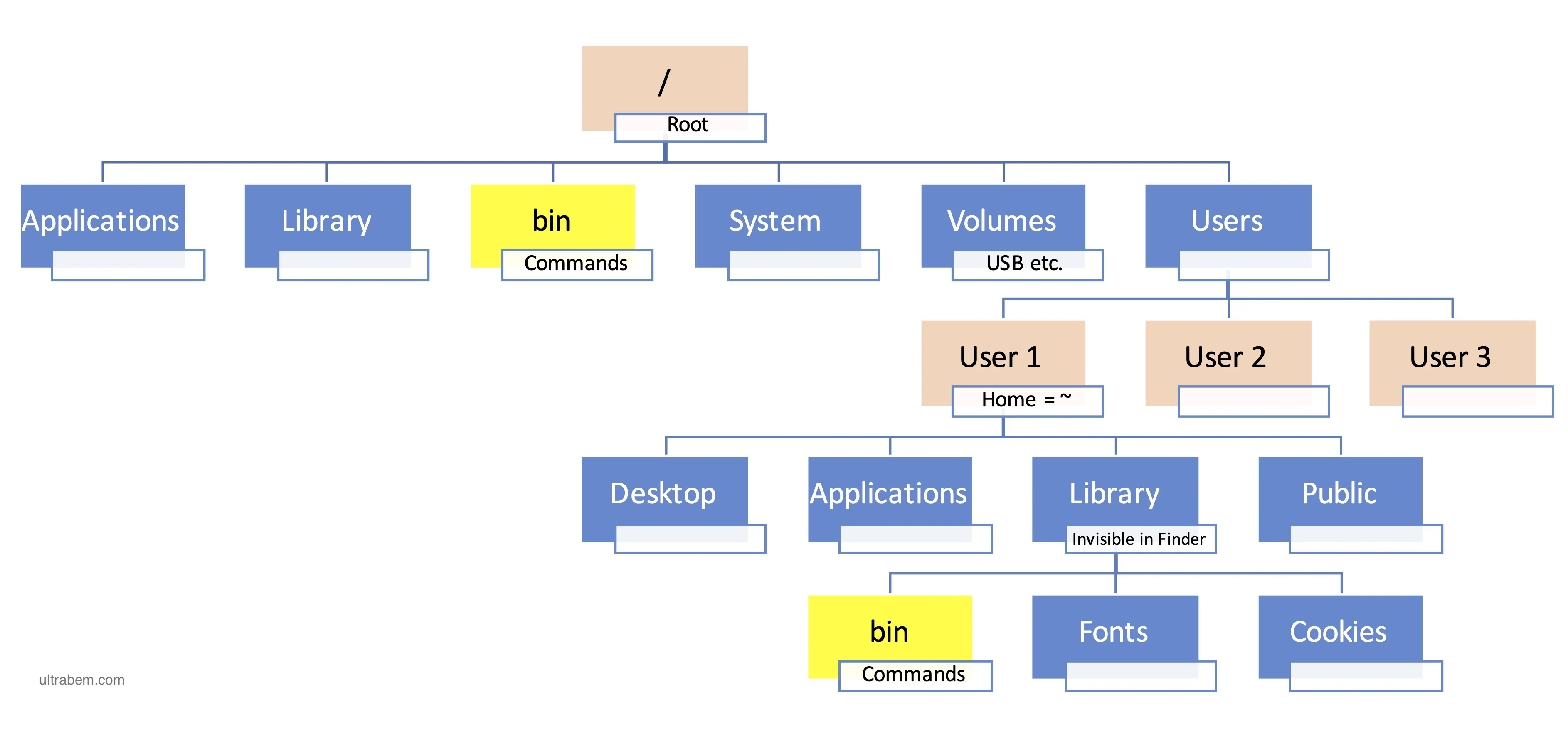
“Print working directory.” This displays your current location in the filesystem hierarchy. You see something like /home/username. Every terminal session has a working directory, a location where commands execute relative to. This is state maintained by your shell. Technically, pwd calls getcwd() system function, which returns the absolute path from filesystem root (/) to your current position.
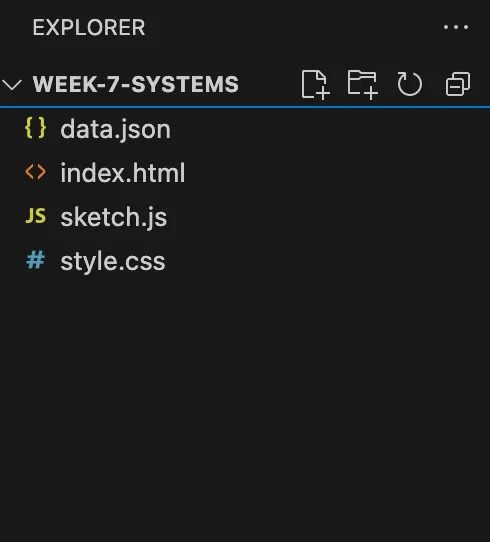
This matters for VSCodium, the editor I mentioned to install last week. When you open VSCodium and tell it to “Open Folder,” you are navigating this same hierarchy. VSCodium’s file explorer on the left shows you the same tree structure that pwd and ls reveal.
Understanding filesystem navigation through command line makes visible what VSCodium’s graphical interface hides: you are always somewhere in this hierarchy. Your code files exist at specific paths. When your p5.js sketch loads an image using loadImage("data/image.png"), that relative path is resolved from your working directory. Understanding pwd means understanding where your code actually runs from.
But what is a directory? Not a physical location. An abstract hierarchy, a data structure, conceptual organisation imposed on storage. The filesystem could be organised differently: flat namespaces, tagged collections, network graphs, associative structures. That it is hierarchical reflects historical decisions, technical constraints, ideological assumptions about information organisation. Hierarchies privilege certain logics (containment, inheritance, tree traversal) over others (association, emergence, multiplicity).
“List.” Shows files and directories. The -l option displays “long” format: permissions, owner, size, modification time. The -a includes hidden files (starting with .). The -h makes sizes human-readable (KB, MB). What happens: ls calls opendir() to open directory, readdir() to read entries, formats output, displays it. But what is being displayed? Filesystem metadata: every file has associated data stored in structures called inodes (index nodes). Permissions control who can read, write, execute. Ownership specifies user and group. Size counts allocated bytes. Timestamps record creation, modification, access. When ls -l runs, it reads inodes and formats that data for you.
This metadata system is not neutral. It encodes particular assumptions: files have owners, access is controlled, actions are logged. These assumptions emerged from time-sharing systems where multiple users shared one computer and needed protection from each other. This is the same principle that’s running on the cluster room machines you are using. They persist in single-user systems not because they are necessary but because they are inherited. Infrastructure accumulates decisions that become naturalized as “how things work.”
Now run these commands and observe the output:
Terminal window
1
cdDocuments
2
pwd
Terminal window
1
cd..
2
pwd
Terminal window
1
cd~
2
pwd
“Change directory.” The .. means parent directory (one level up). The ~ means your home directory. These are conventions, not natural facts. The filesystem uses spatial metaphors: you “navigate” between “locations,” move “up” and “down” a “tree,” things are “inside” folders. But the filesystem is not physical space. It is abstract hierarchy. The spatial language naturalises this particular organisational logic.
Wendy Chun, in Control and Freedom (2006), examines how computing encodes particular relations between control and agency. The filesystem gives you control (you navigate, organise, access) whilst constraining that control (you must operate within hierarchical structure, obey permission systems, accept imposed categories). This is the double bind: enabled action is already structured action. You have freedom within predetermined possibilities.
mkdir is for “make directory.” The filesystem allocates space for directory entry, creates directory file, updates parent to include new entry.
When you start working properly with VSCodium (which you have installed but not yet used for coding), you will need to organise your projects into directories. A typical p5.js project might have structure like:
Directorymy_project/
index.html
sketch.js
style.css
Directoryassets/
Directoryimages/
…
Directoryaudio/
…
Creating this structure through VSCodium’s graphical interface is clicking through menus. Creating it through command line is:
Terminal window
1
mkdir-pmy_project/assets/{images,audio}
2
cdmy_project
3
touchindex.htmlsketch.jsstyle.css
Same result. Different interface. The -p flag creates parent directories as needed. The {images,audio} is brace expansion, creating multiple directories at once. Understanding command line means understanding what VSCodium’s “New Folder” button actually does: it calls mkdir() system function. The button is abstraction. The command is what actually happens.
We have created directories, now let’s create a file:
Terminal window
1
touchREADME.md
2
ls-l
“Touch.” Creates empty file or updates timestamp. The name reveals metaphor: files as objects you manipulate. But files are not objects. They are data structures, metadata, pointers to storage. The metaphor shapes what you can think. Matthew Fuller and Andrew Goffey, in Evil Media (2012), examine how systems encode “evil” not through malicious intent but through unexamined assumptions, inherited logics, naturalised defaults.
When you work in VSCodium, creating a new file through File → New File does exactly what touch does: creates an empty file, allocates inode, adds directory entry. VSCodium abstracts this. You do not see touch being called. You just see a new tab with “Untitled-1”. But understanding touch means understanding what “creating a file” actually means at system level: it is not creating an object but modifying filesystem data structures.
“Echo” prints text. The > redirects output to file (overwriting). “Cat” (concatenate) displays contents. What happens: the shell opens test.txt for writing before running echo, redirects standard output to that file, then runs echo, which writes to what it thinks is terminal. This is shell orchestration. The shell mediates, controls, hides complexity. cat opens file using open(), reads chunks using read(), writes to standard output using write(), closes file. Simple operations combined. This is the equivalent of opening a file in VSCodium, typing “Hello infrastructure”, and saving it.
“Remove.” Permanent. The filesystem removes directory entry, marks storage available. Data might persist but is inaccessible. Be careful.rm -r folder/ deletes recursively. rm -f forces without warnings. rm -rf / could delete everything (modern systems have safeguards, but principle stands: you have power to destroy).
This is ideology embedded in interface. The command line trusts you. When you type rm -rf, it executes without confirmation. It assumes competence. This assumption is political: who is trusted with power? Who needs protection?
This is the pattern: technical features are never just technical. They always encode power relations, assumptions, politics. The command line makes this visible through its directness, its lack of friendly abstraction.
A script is a file containing a series of commands. Instead of typing commands one by one, you write them in a file, make it executable, and run it. The shell reads the file line by line, executing each command as if you had typed it. This is automation: you identify repetitive tasks, codify them as command sequences, delegate execution to the system. This is exactly what we have been doing in p5.js. We write a series of instructions, and the computer executes them all at once. A script.
But what does automation actually do? Dyer-Witheford’s analysis returns here. A script eliminates human labour. It takes a process that required human attention, judgment, time, and reduces it to mechanical execution. The script does not tire, does not get bored, does not make mistakes (if written correctly), does not demand breaks or wages. It is standing reserve (Heidegger’s term): accumulated knowledge ready for instant mobilisation. Labour crystallised as code.
This can be liberatory or exploitative depending on context. If you automate your own tedious work, you might free yourself for more interesting tasks. If you automate someone else’s job, you eliminate their livelihood. If you build automation tools that your employer deploys to eliminate workers, you participate in the cybernetic offensive whilst your own labour becomes increasingly precarious. Software developers are cyber-proletariat (Dyer-Witheford’s term): workers building systems that make workers redundant, including themselves.
Now open this file in VSCodium. You can do this by right-clicking the file in your file manager and choosing “Open with VSCodium,” or from VSCodium: File → Open File and navigate to hello.sh. You could also edit directly in terminal using nano hello.sh (nano is a simple terminal text editor), but let’s use VSCodium until we familiarise ourselves more with the command line.
In VSCodium, type:
1
#!/bin/bash
2
# this is a comment. bash uses # for comments (whereas in javascript/p5, we use //)
3
echo"Hello from a script"
4
echo"Current directory: $(pwd)"
5
echo"Files here:"
6
ls-lah
Save the file in VSCodium (Ctrl+S or File → Save). The first line (#!/bin/bash) is a shebang: it tells the system which interpreter to use. When you run the script, the system reads this line and executes the file using bash. Lines starting with # are comments, ignored by bash. $(pwd) is command substitution: the shell runs pwd, captures output, inserts it into the string.
Back in your terminal, make it executable:
Terminal window
1
chmod+xhello.sh
chmod (change mode) modifies file permissions. +x adds execute permission. Unix permissions control who can read, write, execute files. This is access control inherited from time-sharing era. You need explicit permission to execute. Now run:
Terminal window
1
./hello.sh
The ./ means “current directory.” You need it because bash does not run programs from current directory by default (security measure). You must explicitly say “run this file here.” The script executes, printing output. You have automated a command sequence.
A practical example: script to set up new p5.js project structure (for when you start working with VSCodium properly). Create a new file called new_p5.sh using VSCodium (File → New File → Save as new_p5.sh):
echo"Project '$project_name' created. Open in VSCodium: code $project_name"
Save it, make it executable (chmod +x new_p5.sh), then run: ./new_p5.sh my_sketch. It creates complete project structure. Instead of manually creating folders, files, typing boilerplate in VSCodium, the script does it in seconds. This is automation eliminating your own repetitive labour. But it also reveals: VSCodium’s “New Project” features (in editors that have them) are just graphical interfaces to scripts like this. The script is what actually happens. The button is abstraction.
current_dir=$(pwd) # $(pwd) is command substitution
10
echo"Working in: $current_dir"
11
12
# Arithmetic
13
new_count=$((count+3))
14
echo"New count: $new_count"
Variable assignment has no spaces around = (bash quirk). Access variables with $ prefix. Variables hold strings by default; bash treats them as numbers when doing arithmetic. $(()) is arithmetic expansion.
But variables are not just technical features. They are state management. The script remembers things across commands. This memory enables coordination, enables scripts to respond to changing conditions, enables automation to be adaptive rather than rigid. But memory also enables surveillance: scripts can log, accumulate, track. State management is always about power: who controls state? Who can read it? Who can modify it?
[ -f "data.txt" ] tests if file exists and is regular file. Other tests: -d (directory), -z (string empty), -eq (numbers equal). Spaces around brackets required. This conditional enables scripts to adapt: check conditions, branch behaviour, respond to environment. But conditionals also encode assumptions: what is checked? What is assumed? What edge cases are ignored? Every if statement encodes a worldview about what matters, what is normal, what is exceptional.
Critical example - script that enforces policy:
1
#!/bin/bash
2
# Script that deletes files older than 30 days
3
# (common in automated cleanup systems)
4
5
find.-typef-mtime+30-delete
6
7
echo"Old files deleted"
Questions:
Who decides 30 days is appropriate? What if important files were old?
What recourse do users have? The deletion is automatic, silent.
This is algorithmic governance: rules encoded in scripts, executed without human judgment. Who writes the rules? Who benefits from automated enforcement?
This connects to Week 3’s loops as repetition, automation, mechanical time. But bash loops are different from p5.js loops. They iterate over collections of items. The *.txt expands to all .txt files (glob pattern). This is not for(i=0; i<n; i++) but iteration over existing things. The loop operates on filesystem state, on files that exist, on data already present. It is not generating abstract iterations but processing concrete objects.
This is where command line becomes powerful. You do not write monolithic programs. You combine small tools using pipes:
Terminal window
1
ls-l|grep".txt"
The | (pipe) connects standard output of ls to standard input of grep. Data flows between programs. grep filters for lines containing “.txt”. Result: only text files shown.
Write programs that do one thing and do it well. Write programs to work together. Write programs to handle text streams, because that is a universal interface.
Each program does one task. Complexity emerges from composition. Text is universal interface. This is elegant, powerful, influential. But it is also ideology: it assumes problems decompose cleanly, assumes text representation is adequate, assumes combining small tools beats integrated systems, assumes users are programmers who understand composition. These assumptions are not universal. They reflect particular technical culture (Bell Labs, Unix developers), particular values (elegance, minimalism, programmer efficiency), particular problems (system administration, log processing, build automation).
The Unix philosophy works brilliantly for some contexts. It fails for others (graphical applications, real-time interaction, non-technical users). It is not universal truth but situated practice.
Critical example - pipe that reveals system bias:
Terminal window
1
# Count files by owner
2
ls-l|awk'{print $3}'|sort|uniq-c|sort-nr
This shows how many files each user owns. On shared systems, this reveals usage patterns, activity levels, who has most data. Questions:
What can be inferred from file ownership? Activity, storage use, what people are working on.
This is metadata analysis: not reading file contents but analysing structural patterns. Same technique used by surveillance systems.
The pipe makes this analysis trivial. Power through composition. Who has access to run such analyses?
Allison Parrish uses grep in computational poetry, filtering text corpora to find linguistic patterns, extract phrases based on structure, reveal hidden connections. grep makes visible what was invisible: patterns in data, repeated structures, anomalies. This is infrastructural seeing.
Exercise
Download any book from Project Gutenberg (download as plain text (.txt) file ). Run grep to find patterns in it. What patterns do you find? What structures do you see? What anomalies do you notice?
This generates 10 random words. Run it repeatedly. Each time, different text. Nick Montfort creates poetic systems from shell scripts. The command line becomes generative medium. But notice: this uses /usr/share/dict/words (copy-paste that into your browser), which is English words, standard spelling, particular linguistic assumptions. The randomness is bounded by available vocabulary. Even generative art encodes limitations, exclusions, particular worldviews.
Scripts automate. But automation is never liberation, always reorganisation of labour. Questions:
When you automate your repetitive work, are you freed for creative tasks? Or are you expected to do more work in same time, productivity gains extracted by employers?
If your script processes data that humans used to process, where did those humans go? Unemployment? Different work? Does efficiency benefit workers or capital?
Scripts encode knowledge. The process of writing scripts forces complete understanding: every step, every edge case, every decision. But code privileges certain knowledge (logical, procedural, formalisable) whilst excluding other knowledge (tacit, embodied, contextual). What gets lost?
Who maintains scripts? Automation requires maintenance. Files move, formats change, assumptions break. Maintaining automation is labour, often unpaid. Nadia Eghbal documents how open source maintainers burn out maintaining infrastructure that industries depend on without compensation. Who bears maintenance costs?
What control is centralised? If one person writes the script, everyone else executes that person’s encoded assumptions, processes, logic. This centralises control. Algorithmic management systems are scripts writ large: automated decisions executed on workers who cannot see, challenge, or modify the algorithms. Questions of transparency, accountability, power become urgent.
These questions have no easy answers. But refusing to ask them is complicity. Automation is political. Scripts are power. The command line makes this visible through its directness, its honesty about who commands and who obeys.
Part 3: Servers and the Politics of Remote Control
Everything we have explored this week operates on single machine: your Ubuntu VM. You type commands, the system executes them locally. But what happens when commands cross networks?
A server is just a computer running continuously, listening for requests, responding to them. Nothing special about hardware. What makes it “server” is its role in client-server architecture. You (client) make requests. Server fulfils them. Your web browser requests HTML. Web server sends it. Your p5.js sketch fetches JSON. API server provides it. Client-server.
This model enables command at distance. You sit at terminal, connect to server elsewhere (across room, country, planet), type commands, server executes them. This is what time-sharing was: remote control of shared computation. The internet is time-sharing at planetary scale. SSH (Secure Shell) is how you command remote machines via encrypted text interface. Every cloud server, every deployment, every remote system: commanded through terminal interfaces or APIs (which are programmatic command lines).
The command line extends across networks. What was local control becomes distributed control. But control over what? Controlled by whom? For whose benefit?
Tung-Hui Hu argues “the cloud” is metaphor obscuring material reality. Clouds: light, ephemeral, natural, everywhere and nowhere. Actual cloud computing: massive data centres consuming enormous electricity, built on repurposed military bases, concentrated where land is cheap and regulations lax. The metaphor hides location (whose jurisdiction?), ownership (who controls?), labour (who maintains?), energy (what powers this?), environmental cost (cooling, e-waste, extraction).
Cloud computing is extraordinarily centralised. Amazon’s AWS went-down two weeks ago and it disrupted millions of services including Netflix, Amazon.com, Disney+, thousands of services stopped functioning. Just this week, Cloudflare had issues and it affected majority of internet’s traffic. Single points of failure affecting millions.
When you rent cloud servers, you command someone else’s computers. You have access but not ownership. If providers change terms, raise prices, shut down, your infrastructure disappears. This is centralisation disguised as distribution. And every command you send to cloud servers travels through this infrastructure: cables laid along colonial trade routes, data centres consuming more electricity than small nations, cooling systems using water in drought-stricken regions, hardware requiring rare earth extraction that devastates landscapes and poisons workers. Your simple bash script executing remotely is implicated in all of this.
We have explored scripts automating tasks. But what happens when scripts command humans? Algorithmic management: software automating managerial functions. Uber algorithms assign rides, set prices, evaluate through ratings, deactivate accounts without explanation. Amazon warehouse algorithms assign tasks, monitor productivity, enforce pace through devices that vibrate when workers slow down. The algorithm is invisible manager: comprehensive, instantaneous, opaque.
This connects directly to Dyer-Witheford’s cybernetic offensive. Automation eliminates human labour (workers), cheapens it (global supply chains, gig economy precarity), evades it (algorithmic trading, automated management). Scripts at scale become systems of control. Workers experience these systems as inescapable but cannot see, challenge, or modify the logic commanding them. Asymmetric information: management has complete data about workers; workers have minimal data about evaluation criteria.
When you write scripts, you participate in this dynamic. Every automation eliminates labour. Whose? Scripts encode assumptions, priorities, logic. Whose knowledge and biases? Who maintains automation as systems change? Whose responsibility? These questions have no easy answers. But command line’s directness makes them visible. You type rm file.txt, file is deleted. Clear, explicit, accountable. When algorithm commands worker, that command hides behind “optimization,” “efficiency,” “data-driven decisions.” Same power relation. Different visibility.
The command line is not only tool of control but site of resistance. Hundred Rabbits creates art on solar-powered computers using command lines for efficiency and sustainability, refusing planned obsolescence and growth imperatives. Constant vzw runs feminist servers organised around care, consent, accountability rather than profit. Ingrid Burrington maps physical internet infrastructure, making visible what cloud metaphors hide. Allison Parrish uses command line text processing for computational poetry. Everest Pipkin creates glitch art through bash scripts. Artists make infrastructure strange, questionable, repurposable. Solar Protocol reconfigures internet protocls using natural intelligence. Low-tech magazine uses solar energy to power it’s servers.
Alternative models exist: self-hosting (running your own servers), federation (Mastodon, Matrix, distributed but communicating), peer-to-peer (IPFS, no servers at all). These require more work, more knowledge, more maintenance. But they demonstrate centralisation is not inevitable. It is choice. Currently convenience beats autonomy. But what would computing look like organised around different values? Not profit, efficiency, growth, but care, sustainability, justice, collective ownership?
Understanding command line transforms how you work with VSCodium. The editor uses git (command line version control), stores extensions in filesystem directories, edits configuration through JSON files. It is abstraction over command operations. Understanding this means you can troubleshoot, customise, automate beyond what graphical interface exposes. You can write scripts that automate your entire development workflow: project setup, file generation, deployment. But always ask: whose labour am I automating? What am I optimising for? Who benefits?
First, read Raphaël Bastide’s being script. Read it slowly. Read it as poetry, as manifesto, as technical philosophy.
Bastide writes from the perspective of Deval, a script that speaks: “I am a script, I am a weapon and a caress.” The essay theorises scripts not as mere tools but as living documents that carry the smell and rhythm of the hands that write them, that resist commodification, that exist between control and loss of control.
Your task: Create a command-line script that engages with Bastide’s conception of what scripts are and can be.
This is deliberately open. You might:
Make a script that reveals its own making – show your hesitations, your comments to yourself, the traces of your labour. Let it speak about itself, about you writing it
Create something that resists efficiency – scripts that take time, that unfold slowly, that waste cycles beautifully. What does it mean to write “unoptimised” code in an age of performance metrics?
Write a script with smell – one that carries your particular rhythm, your particular moment. What makes it yours and not generated, not templated?
Make something that propagates like a samara – light, independent, able to land on different systems and mutate. Or heavy like a pebble – archival, sedimentary, recording its own history
Create a script that performs resistance – “I am a script that rises up, I do not make war, I resist.” What does computational resistance look like at the command line?
Write something between control and loss of control – Bastide locates scripts’ magic “between knowledge and the loss of control.” Where is that space in your work?
Constraints:
Must run and live on the command line (bash via terminal)
Bastide distinguishes handcrafted scripts from AI-generated code: “There are also the hands for which this is the first time, for which each keystroke is a surprise, a powerful adventure. But at the moment some hands are being moved by other, synthetic hands.” What traces of your hands remain in your script? How is your labour visible or invisible?
“Each line of code is political.” What politics are encoded in your script’s choices? What assumptions does it make? Who can run it? Who would want to?
Bastide writes that scripts have ancestors: songs, spells, incantations. What is your script’s lineage? Does it descend from a particular tradition of computational practice? Does it invoke? Does it enchant?
“Do not finish your tools, use them.” Is your script finished? Should it be? What would it mean for a script to remain perpetually unfinished, in process?
“A script is a free breath in a reality where the lungs are controlled.” How does your script create space for breath in controlled systems? Or does it participate in that control?
Bastide opposes the “merchants” who compress and commodify. Does your script resist extraction? Or does it depend on centralised infrastructure, proprietary tools, cloud services? Can command-line art exist outside capitalist infrastructure?
“Interpretation is to the script what language is to the voice, a filter which solidifies its power but dries up its intensity.” Your script will be interpreted by a shell, by a machine. What is lost in that translation? What is gained?
Due to the nature of this task, we won’t be able to use the usual p5.js web editor to submit your work. Instead, we’ll use termbin, a service that allows you to share command-line scripts.
We will use termbin, which is a simple file sharing service. It is an external platform, which means we need to know how they are using our data. Have a look through their privacy policy (acceptable use policy at the end of termbin.com). If you prefer not to use this service, but a different one, that’s fine. Do let me know.
Upload your script to termbin:
Terminal window
1
catyour-script.sh|nctermbin.com9999
Make sure to replace your-script.sh with the name of your script file. Once you run this command, you should see a URL appear in your terminal (something like this https://termbin.com/xhrb). Copy this URL and share it on the Student Works page under Week 8.
Use this resource, look thing up, get into stackoverflow forums, adapt examples you find online, and most importantly, have fun!