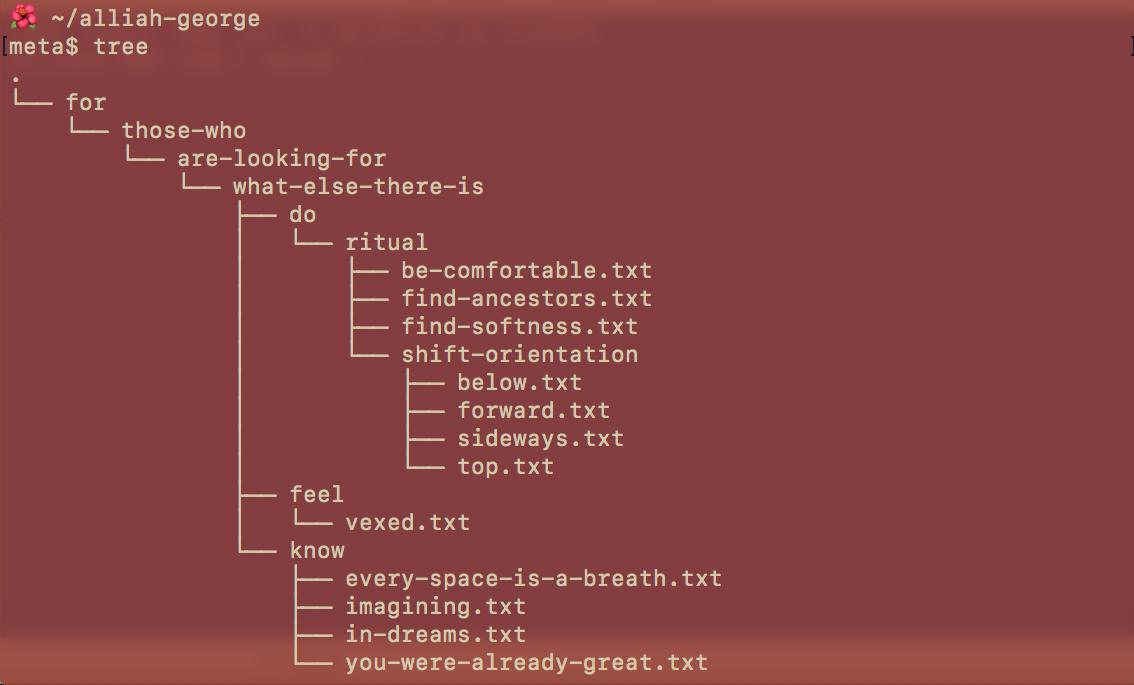
Week 7 - Systems
Systems: Infrastructure, Control, and Local Development
Section titled “Systems: Infrastructure, Control, and Local Development”Infrastructures and Invisibility
Section titled “Infrastructures and Invisibility”For five weeks, you’ve typed code into the p5.js web editor. Press play, see results. It works. You don’t ask how. This is infrastructure functioning as designed — invisible until it breaks. Susan Leigh Star writes in “The Ethnography of Infrastructure” (1999) that good infrastructure disappears into the background, becoming transparent to use. We only notice electricity when power fails, water when pipes burst, servers when they crash. The web editor succeeds because you never have to think about servers, networks, file storage, or execution environments.
But invisibility has politics. When infrastructure disappears, so do questions about power. Who owns these servers? What data do they collect? Who can access them? What happens when they shut down? Infrastructure invisibility is often infrastructure privilege; those who control systems benefit when others stop noticing control exists.
This week, we make infrastructure visible by moving to local development. Not because local is “better”; it’s in fact more complicated, and more things break more often, and so more we must understand. But complication reveals structure. When you set up your own environment, you see what the web editor hides: files as organised data, folders as hierarchies, browsers as execution environments, servers as programs serving files. You see that “the cloud” is just computers owned by corporations. You see infrastructure as built, maintained, contested, political.
In The Stack: On Software and Sovereignty (2015), Benjamin Bratton argues that contemporary computing organises as planetary-scale layers, from Earth (rare earth mining, fibre optics) through Cloud (data centres) to Interface (screens) to User (you, tracked and monetised). The web editor sits high in this stack. Moving local means descending through layers, seeing dependencies, confronting the material base that makes computation possible.
Let’s begin by examining what the web editor actually does when you press play.
Part 1: What happens when we run code
Section titled “Part 1: What happens when we run code”You type JavaScript in the web editor, press the play button, shapes appear on canvas. This seems immediate, direct, simple. It’s not. Here’s what actually happens:
The Request Chain
Section titled “The Request Chain”- Your browser makes an HTTP request. When you load editor.p5js.org, your browser (Chrome, Firefox, Safari) sends a request to the Processing Foundation’s web servers asking for the editor application’s HTML, CSS, and JavaScript files.
- The server responds. The Foundation’s servers (likely running Node.js or a similar server-side framework) send some information back the editor application. This isn’t one file; it’s dozens: HTML structure, CSS styling, JavaScript for the text editor interface where you type, the console display, the play button functionality.
- Your browser loads external dependencies. The editor’s HTML contains
<script>tags referencing external libraries. Your browser makes more HTTP requests to Content Delivery Networks (CDNs) to fetch p5.js itself. This is infrastructure centralisation: Cloudflare controls significant CDN traffic globally. When you load p5.js, you’re requesting it from Cloudflare’s servers, not the Processing Foundation’s. - Your sketch code is transmitted. When you press play, the editor sends your code to the Processing Foundation’s servers. Your code is stored in their database (MongoDB, PostgreSQL, or similar), attached to your user account. When you reload the page later, it retrieves your code from their servers. Your creative work lives on someone else’s computer.
- JavaScript execution begins. Your browser’s JavaScript engine (V8 in Chrome, SpiderMonkey in Firefox, JavaScriptCore in Safari) compiles your code to machine instructions and executes it. This happens on your CPU, using your computer’s memory, consuming your electricity. But the code itself came from elsewhere.
- p5.js creates DOM elements. The p5 library manipulates the browser’s Document Object Model (the tree structure representing your webpage). It creates a
<canvas>element, gets its 2D rendering context, starts drawing. The canvas is a bitmap updated 60 times per second. - The draw loop runs. Your
draw()function executes repeatedly through the browser’s event loop. This is asynchronous coordination you don’t control: your code runs, the browser repaints, JavaScript events fire, network requests complete, all interleaved through a scheduling system operating beneath your code.
This is dozens of HTTP requests, multiple servers in different locations, complex parsing and compilation, continuous execution loops. All invisible. The web editor makes it seem like your code “just runs.” Actually, it runs on your hardware, inside a JavaScript virtual machine, inside a browser application, after being transmitted over networks owned by ISPs and cloud providers, from servers owned (or more likely leased) by the Processing Foundation and hosted by a cloud service provider like Amazon, Google, IBM, Microsoft, Cloudflare (Cloudflare is where this platform itself is hosted) etc.
Every layer is infrastructure. Every layer has politics.
Who controls this infrastructure?
Section titled “Who controls this infrastructure?”The Processing Foundation doesn’t own physical servers, they rent computational resources from cloud providers. According to Synergy Research Group, as of Q2 2025, Amazon’s AWS controls 30% of the global cloud infrastructure market, Microsoft Azure controls 20%, Google Cloud controls 13%. These three companies host most of the internet. When AWS had an outage last week, Alexa voice assistants stopped working, Ring doorbells went offline, Disney+ streaming failed, popular messaging apps stopped working, and a majority of online services were down. One company’s failure affected hundreds of services because infrastructure is centralised.
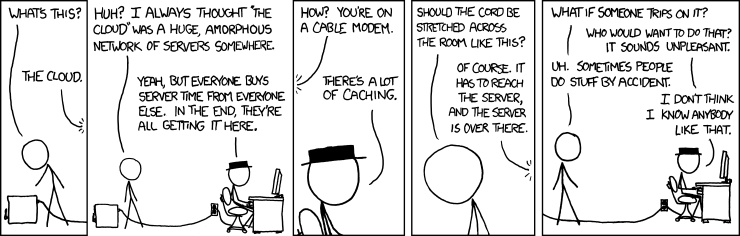
This centralisation isn’t natural or inevitable. It results from specific economic forces: economies of scale (bigger data centres are cheaper per unit), network effects (more services on AWS means more AWS tooling, meaning that you’re tied into using a bunch of tools that you can’t easily switch out of - the infamous vendor lock-in), capital accumulation (Amazon can spend billions building data centres). Tung-Hui Hu writes in A Prehistory of the Cloud (2015) that “the cloud” is a metaphor that mystifies material reality. Clouds are ethereal, distributed, natural. Data centres are concrete, centralised, built. Calling it “cloud computing” hides who owns the computers, where they are, what extracting and powering them costs.
Kate Crawford documents this in Atlas of AI (2021): data centres consume enormous energy, some as much as small cities. They require cooling systems running constantly. They’re built in locations with tax breaks and minimal environmental oversight. The servers contain rare earth minerals mined in conditions that are often exploitative and environmentally destructive. “The cloud” naturalises this extraction, making it invisible background for your code to run “in the air.”
When you use the web editor, you participate in this system. Not through complicity or guilt, but because infrastructure shapes what’s possible. You can’t opt out of using servers. You can’t write web code that doesn’t execute on hardware somewhere. But you can notice. You can ask: Who benefits from me not knowing where my code runs? Why is this infrastructure centralised? What alternatives exist?
The Browser as Environment
Section titled “The Browser as Environment”Your p5.js code runs in a JavaScript engine - - a virtual machine that compiles and executes JavaScript. These are among the most complex software systems ever built: millions of lines of low-level languages, implementing JavaScript specifications, optimising for speed, managing memory, providing security. Chrome uses V8, Firefox uses SpiderMonkey, Safari uses JavaScriptCore etc.
Why does this matter? Because the engine determines what’s possible. JavaScript can’t access your file system directly (security constraint). JavaScript can’t make network requests to different domains without permission (same-origin policy). JavaScript runs single-threaded with an event loop for concurrency. These aren’t neutral technical details, they’re design decisions encoding assumptions about what code should be allowed to do.
When you write JavaScript, you write within constraints established by browser vendors (Google, Mozilla, Apple), standards bodies (ECMA International), and historical decisions made decades ago (Brendan Eich created JavaScript in 10 days in 1995). Your creative code exists within this infrastructural sediment; layers of prior decisions that feel like “just how things work” but are actually specific choices that could have been different.
Alexander Galloway writes in The Interface Effect (2012) that interfaces aren’t neutral windows onto computation, they’re ideological constructs encoding assumptions about user agency, system access, appropriate interaction. The browser is an interface presenting computation as safe, sandboxed, limited. You can make shapes appear on canvas, but you can’t access the underlying system. The interface protects the system from you, but also protects you from the system’s complexity. This protection is also constraint.
Open-source, dependencies, and labour
Section titled “Open-source, dependencies, and labour”The web editor works because people maintain it. Developers at the Processing Foundation and their active community write code, fix bugs, update libraries, keep servers running, respond to security issues. This is labour, often unpaid or underpaid. Nadia Eghbal documents in Working in Public (2020) that most open source infrastructure is maintained by a small number of people, often for free, often whilst dealing with demanding users and burnout.
When you use the web editor, you depend on this labour. The editor will work until it doesn’t, until the funding ends, until the maintainers quit, until priorities shift. Infrastructure requires continuous maintenance: security patches, server updates, bug fixes, feature additions. This maintenance is mostly invisible until it stops. Then the infrastructure breaks, becomes visible, reveals its dependency.
Local development doesn’t eliminate dependency, you’ll still use browsers (maintained by corporations), libraries (maintained by communities), operating systems (maintained by the same corporations). But it shifts dependency. Instead of relying on the Foundation’s servers staying online, you rely on your own computer working. Instead of trusting their infrastructure decisions, you make your own. This isn’t pure autonomy, because that doesn’t exist in networked computing. It’s recognising dependency, making some of it visible, choosing where to trust.
Part 2: Local Development - Setting Up Your Environment
Section titled “Part 2: Local Development - Setting Up Your Environment”VSCodium, Not VSCode
Section titled “VSCodium, Not VSCode”First, download and install VSCodium. VSCodium is a text editor for code. It is identical to Microsoft’s popular VSCode (Visual Studio Code), but with all telemetry removed. Let’s be clear about what this means.
VSCode, owned by Microsoft, collects telemetry: data about how you use the software. According to Microsoft’s documentation, this includes: hash of your network adapter MAC address (for user identification), which extensions activate for specific file types, workspace identification via hash of Git remotes, extension recommendation metrics, performance data. This data is “anonymised” but, as Arvind Narayanan and others have demonstrated, anonymised data is often re-identifiable when combined with other datasets.
Why does Microsoft want this data? Officially: to improve the product, understand usage patterns, fix bugs. Actually: to understand developers, what tools you use, what languages you code in, what problems you struggle with, what productivity patterns look like. This knowledge is valuable. It informs product development, competitive strategy, acquisition targets.
Telemetry turns your tool into surveillance. Your coding process, mistakes, experiments, debugging patterns, thinking rhythms, all become data extracted for corporate benefit. Shoshana Zuboff calls this “surveillance capitalism” in her 2019 book: systems that extract behavioural data, analyse it, use it to predict and modify future behaviour. You think you’re using a text editor; actually, the text editor is using you as data source, as product, as subject of continuous monitoring.
VSCodium strips this out. According to the VSCodium repository, it’s built from VSCode’s open-source codebase but recompiled without Microsoft’s telemetry modules. An automated script uses ripgrep to find all Microsoft telemetry domains (*.data.microsoft.com) throughout the codebase and replaces them with 0.0.0.0 (a non-routable address), breaking telemetry connections at source code level. Same interface, same features, no data collection. And none of this makes VSCodium a better editor, in fact it realies on a community of volunteers to maintain it - no stable funding, no profit motive, no corporate support. It’s a choice, a political decision.
This is an infrastructural choice: you can use any tool you’d like, maintained by whoever has the motive and capacity to maintain it. There are things we can do on Microsoft’s build of VSCode that we cannot do on VSCodium. There are features that are different. Most users don’t know surveillance is happening because it’s invisible, designed to be unnoticed. Making it visible through projects like VSCodium, through privacy analysis, through critical attention enables choice. We can choose the tools that we want to use.
Opening VSCodium and Understanding Your File System
Section titled “Opening VSCodium and Understanding Your File System”After installing VSCodium, you’ll need to create a project. But first, understand what files and folders actually are.
A file is a sequence of bytes stored on persistent storage (hard drive, SSD). The file system software that’s part of your operating system manages this storage: tracking which bytes belong to which files, where files are located on disk, who has permission to read or modify them, metadata like creation dates and sizes.
When you create a file called sketch.js, the file system allocates space on your storage device, writes your code as bytes (text encoded as UTF-8), creates a file system entry associating the name “sketch.js” with that storage location, and stores metadata.
Folders (directories) are special files containing lists of other files. When you create a folder called week-7/, the file system creates a file storing references to other files. Hierarchical organisation (folders inside folders) is implemented through these references.
This hierarchy isn’t natural. It’s one organisational model among many. Before hierarchical file systems, mainframes used flat organisation. Unix designed hierarchies in the 1970s and that design became dominant through historical contingency, not because folders are the “natural” way to organise data.
Laurel Schwulst writes about digital architecture as expressive choice: how you organise files isn’t just practical—it’s a statement about relationships, priorities, hierarchy. Melanie Hoff’s folder poetry, where folder names and structures create poetic meaning.
Creating Your p5.js Project
Section titled “Creating Your p5.js Project”Create a folder somewhere on your computer called week-7-systems. Inside it, create three files:
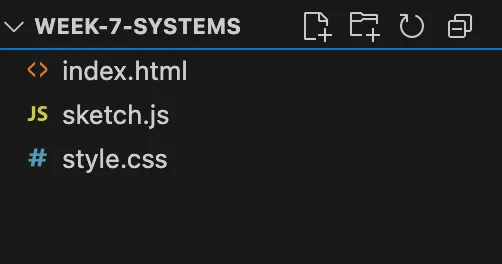
index.html
<!DOCTYPE html><html lang="en"><head> <meta charset="UTF-8"> <meta name="viewport" content="width=device-width, initial-scale=1.0"> <title>Week 7 Systems</title> <link rel="stylesheet" href="style.css"> <script src="https://cdnjs.cloudflare.com/ajax/libs/p5.js/2.0.4/p5.min.js"></script></head><body> <script src="sketch.js"></script></body></html>style.css
html, body { margin: 0; padding: 0;}canvas { display: block;}sketch.js
function setup() { createCanvas(600, 600);}
function draw() { background(220); fill(0); circle(width/2, height/2, 100);}How These Files Work Together
Section titled “How These Files Work Together”HTML (HyperText Markup Language) defines structure. It’s a tree of elements: <head> contains metadata, <body> contains visible content. The <link> tag tells the browser to fetch and apply style.css. The <script> tags tell the browser to fetch and execute JavaScript - first p5.js from Cloudflare’s CDN, then your sketch.
CSS (Cascading Style Sheets) defines presentation. It selects HTML elements and applies visual rules. CSS is declarative, meaning you describe desired state, the browser figures out how to achieve it.
JavaScript defines behaviour. It’s imperative code-step-by-step instructions. p5.js provides functions wrapping browser APIs. When you call circle(), p5 translates this to canvas 2D context operations.
This separation in structure (HTML), presentation (CSS), behaviour (JavaScript) is architectural ideology. It assumes these concerns should be separate, that mixing them is bad design. But React, Vue, and other frameworks challenge this, putting HTML/CSS/JS together in components. Separation isn’t natural law; it’s design philosophy encoded in web standards during a particular historical moment.
Why You Need a Local Server
Section titled “Why You Need a Local Server”Try this: open index.html directly in your browser (double-click the file, or drag it into a browser window). You’ll see the URL bar shows file:/// followed by the path. The canvas appears. Everything works.
Now try loading external resources. Add this to your sketch:
function setup() { createCanvas(600, 600); loadJSON('data.json', dataLoaded);}
function dataLoaded(data) { console.log(data);}Create a data.json file in the same folder:
{"message": "testing"}Reload the page. Open the browser console (we’ll cover this properly next). You’ll see an error: “Access to XMLHttpRequest at ‘file:///…/data.json’ from origin ‘null’ has been blocked by CORS policy.”
This is the same-origin policy, a browser security feature. Browsers prevent JavaScript from making requests to different origins (protocol + domain + port combinations) without explicit permission. When you open a file:// URL, the origin is null, there’s no domain. The browser treats all file:// URLs as potentially different origins and blocks them from reading each other.

Why? Security. This prevents malicious scenarios: a local HTML file shouldn’t be able to read arbitrary files on your system. But it also prevents legitimate development: loading resources for your own project.
The solution: run a local web server. A web server is a program that listens for HTTP requests and responds with files. When you run a server on your computer, files are served via http:// protocol (origin http://localhost:PORT) rather than file:// protocol (origin null). Same-origin policy allows http://localhost:8000/sketch.js to request http://localhost:8000/data.json because they share the same origin.

Setting Up Live Server
Section titled “Setting Up Live Server”In VSCodium:
- Click the Extensions icon (four squares) in left sidebar
- Search “Live Server”
- Install it
- Right-click
index.html, select “Open with Live Server”
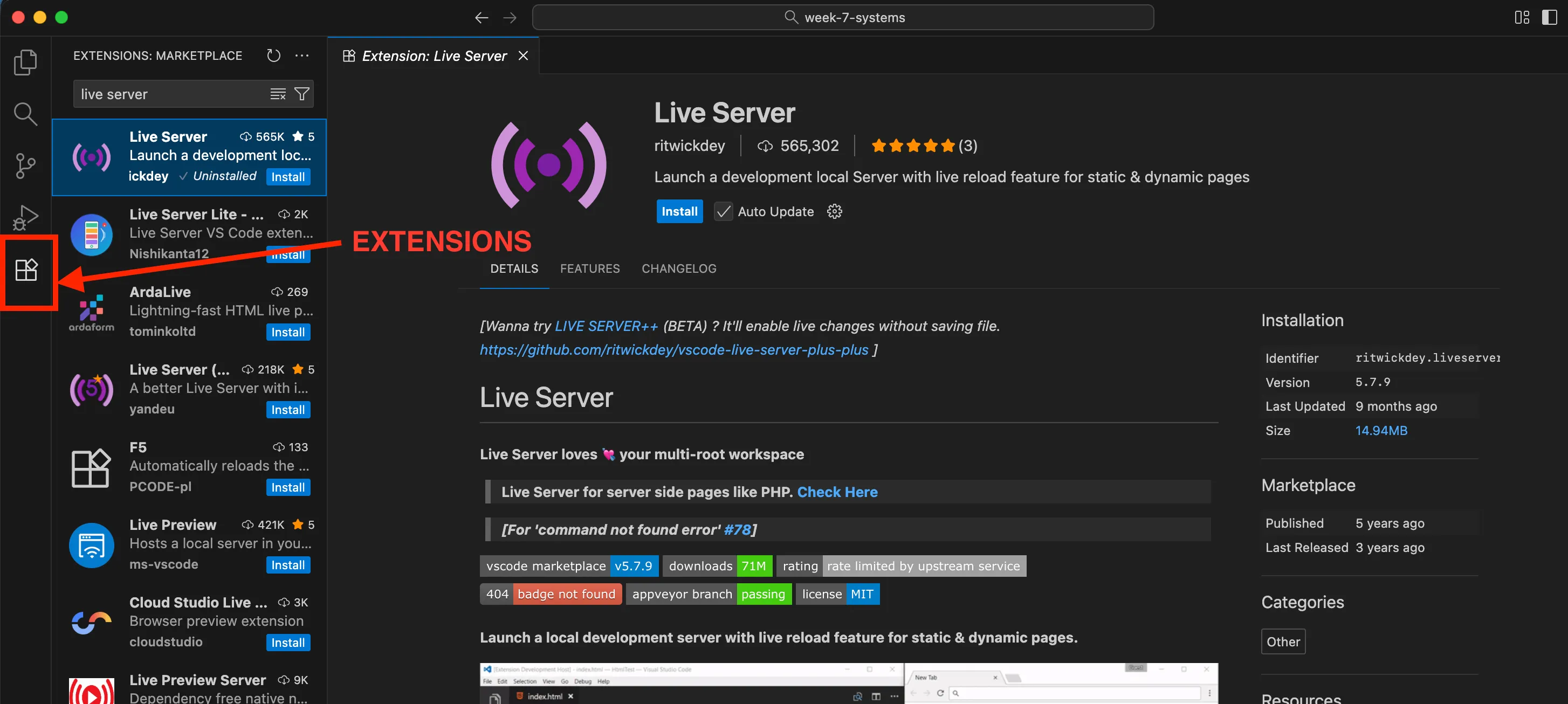
Your browser opens http://localhost:5500/index.html (or similar port). Now external resources load. The server is running on your computer, serving files from your folder. When you edit files and save, Live Server automatically reloads the browser.
This is infrastructure made visible. Instead of files magically loading, you see the server process, the HTTP protocol, the origin policy, the relationship between file system and network requests.
Part 3: The Poetics of Browser Console
Section titled “Part 3: The Poetics of Browser Console”Opening the Console
Section titled “Opening the Console”In your browser, press:
- Windows/Linux:
F12 or Ctrl + Shift + I - Mac: ⌘ + ⌥ + I
The Developer Tools panel appears. Click the “Console” tab.
You’re looking at the browser console: a text interface to the JavaScript execution environment. It’s been there the entire time you’ve used browsers to load websites, watch videos; but it’s hidden unless you deliberately open it. Most web users never see it. It exists for developers, but “for developers” doesn’t mean unavailable to others. Anyone can open the console. The question is: who knows it exists? Who understands what it does? Why is it important? Or is it important at all?
Infrastructure is political partly through who has access, but also through who knows access is possible.
What the Console Is
Section titled “What the Console Is”Technically, the console is a REPL: Read-Eval-Print-Loop. It reads input (you type JavaScript), evaluates it (the engine executes your code), prints the result (displays return value), loops (waits for more input).
This is immediate execution. Unlike your sketch file—where you write code, save, reload browser—the console executes as you type. Press Enter, code runs instantly. You can inspect variables, call functions, modify page state, all in real-time.
Try this:
console.log("Hello from console");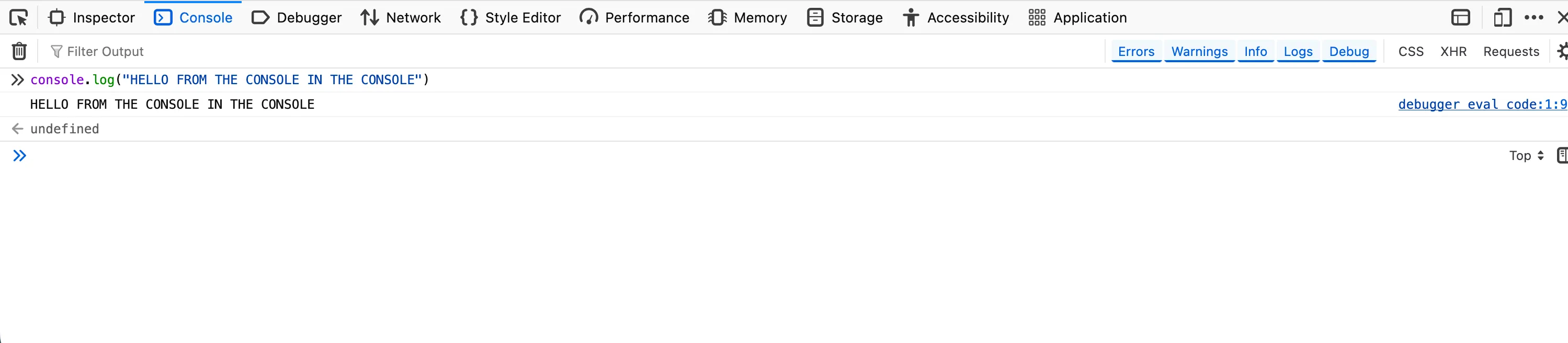
The message appears. Now try:
let x = 5 + 10;xThe console displays 15. Try:
document.body.style.background = "red";The page background changes. You’ve modified the DOM in real-time. The console isn’t just for viewing—it’s for doing. It’s a live interface to the page’s computational state.
How about
document.body.innerHTML = "<h1>POOF</h1>";Console as Debugging Tool
Section titled “Console as Debugging Tool”The primary “legitimate” use is debugging: finding and fixing errors. When your JavaScript throws an error, it appears in console. You can add your own logging:
function setup() { console.log("setup started"); createCanvas(600, 600); console.log("canvas created, width:", width);
console.table([ {name: "canvas", width: width, height: height}, {name: "window", width: windowWidth, height: windowHeight} ]);}
function draw() { // watch performance if (frameCount % 60 === 0) { console.log("Frame:", frameCount, "FPS:", frameRate().toFixed(2)); }}This creates a trace: evidence of execution, markers of progress, values at specific moments. Debugging is archaeology—reconstructing what happened by examining traces left behind.
Console as Expressive Space
Section titled “Console as Expressive Space”Some websites print messages in the console. Not errors, only deliberate messages for people who look. Try opening the console on major sites. You’ll find recruitment messages, ASCII art, security warnings, community acknowledgements.
These are console Easter eggs: hidden messages only visible to those who open developer tools. Artists have used console as medium. Some projects put significant content in console messages rather than visible interface, making the console secret space accessible to those who know to look.
You can create hidden messages in your work:
function setup() { createCanvas(600, 600); background(220);
// Visible on canvas textSize(20); text("What you see", 10, 30);
// Hidden in console console.log("%c What you find", "font-size: 20px; colour: #4CAF50;"); console.log("If you're reading this, you looked deeper."); console.log("Most people won't. Infrastructure stays invisible."); console.log("But you noticed. You investigated. You questioned.");}The %c allows CSS styling in console output. This creates layered experience: surface (canvas) and depth (console). Most viewers see only canvas. Those who open console discover additional content—not better or more important, but different. Accessible through curiosity and technical knowledge about where to look.
Is console content “public”? It’s technically accessible to anyone, but practically accessed only by those with certain knowledge. Is this elitist? Making content inaccessible to many? Or is it recognition that different audiences engage differently, and spaces can exist for those who dig deeper?
But console access doesn’t mean privacy. Everything you type is part of your browser session—stored in history, potentially logged by browser extensions, visible to any code running on the page. If you’re debugging work projects on company computers, IT might monitor console usage.
Wendy Chun writes in Control and Freedom (2006) that computer users exist in tension between control (you can command the machine) and constraint (the machine limits what’s possible, monitors what you do). The console embodies this: it grants control over page state, but exists within controlled environment—the browser, the OS, the hardware, the network, all layers that constrain what’s possible and watch what you do.
Weekly Task #6: Setting Up Your Local Environment
Section titled “Weekly Task #6: Setting Up Your Local Environment”While this week’s task is not a formal assignment, it is important to set up your local environment to begin this week’s work, and also to start preparing for your performances and the module contents in the upcoming weeks as we move into working with code locally on our VMs.
Instructions
Section titled “Instructions”So for this week, the task is simple:
- Download and setup VSCodium
- Install Live Server extension on VSCodium
- Set up a directory structure for this module’s work (see below for recommended structure)
- Create a new p5.js sketch in the HTML file
- Run the sketch in the browser with the live server
DirectoryCC0/
Directoryweek-5
- index.html
- script.js
- style.css
- README.md
Directoryweek-6
- index.html
- script.js
- style.css
- README.md
Directoryweek-7
- index.html
- script.js
- style.css
- README.md
Directoryweek-8
- index.html
- script.js
- style.css
- README.md
- …
Here’s a handy tutorial that walks you through VSCode (VSCodium and VSCode look and work exactly the same, telemetry is really the only difference)
Resources
Section titled “Resources”Readings
Section titled “Readings”Susan Leigh Star, “The Ethnography of Infrastructure” (1999)
Foundational text establishing that infrastructure is: embedded in other structures (invisible until breakdown), transparent to use (works without conscious attention), learned through membership in communities, linked with conventions (shaped by historical decisions), embodying standards.
Benjamin Bratton, The Stack: On Software and Sovereignty (2015) - Introduction & Chapter 1
Theorises contemporary computing as planetary-scale layers: Earth, Cloud, City, Address, Interface, User. Each layer depends on those below and constrains those above. Read for: how sovereignty and control function at different scales, how technical architecture becomes political geography.
Tung-Hui Hu, A Prehistory of the Cloud (2015) - Chapter 1
Demystifies “the cloud”—revealing massive data centres consuming enormous electricity, built on repurposed military bases, concentrated in locations with cheap land and lax regulations. Read for: connection between metaphor and material reality, how language shapes what we can think about infrastructure.
Kate Crawford, Atlas of AI (2021) - Chapter 1: “Earth”
Traces AI/computation from material extraction: mining rare earth metals, environmental destruction, labour exploitation. No computation without mining, manufacturing, energy infrastructure.
Wendy Chun, Control and Freedom (2006) - Introduction
Analyses how users experience simultaneous control (commanding computers) and surveillance (computers monitoring users). Relevant to both console and command line.
Alexander Galloway, The Interface Effect (2012) - Introduction & Chapter 1
Argues interfaces aren’t neutral windows but ideological constructs encoding assumptions about users and systems.
Nadia Eghbal, Working in Public (2020) - Introduction & Chapter 1
Documents the labour of maintaining open source software—mostly unpaid, often thankless, essential to internet functioning.
Artists and Artworks
Section titled “Artists and Artworks”- JODI - Net art deliberately breaking web structure
- Nick Montfort’s computational poetry
- Everest Pipkin’s terminal poems
Technical Resources
Section titled “Technical Resources”- MDN: Same-origin policy
- Software Carpentry: Unix Shell
- The Odin Project: Command Line Basics
- Fun with console.log()
Questions to Sit With
Section titled “Questions to Sit With”Before we talk more about infrastructure and working with systems, sit with these questions:
- When does infrastructure become visible to you? What has to break, or what investigation must you undertake?
- Who benefits from infrastructure invisibility? Who is harmed by it?
- What trade-offs do you make between convenience and autonomy?
- How does technical literacy function as gatekeeping? As empowerment? Can it be both?
- What would computing look like if organised around different values—not profit or efficiency, but care, sustainability, justice?
Infrastructure isn’t neutral plumbing. It’s built systems encoding values, concentrating power, requiring maintenance, breaking down, getting rebuilt. Making it visible is the first step toward questioning it.
See you next week!