Welcome to Week 5. This week we encounter something fundamentally different from everything we’ve learned so far: the event. An event is not an instruction you write. It’s not a variable you declare or a loop you construct. An event is a moment. Something that happens in time you don’t control. A click. A keypress. A sound ending. A message arriving.
Events are how systems wait. How they listen. How they respond. And this makes them deeply cybernetic. They’re about feedback loops, about circular causality, about systems that watch for signals and adjust their behaviour accordingly.
But before we dive into the technical mechanics, we need to understand what events are politically. Because events aren’t just a programming pattern, they’re a model of control, of attention, of labour. Their patterns emerge from a particular history of thinking about systems, management, and power.
In 1948, Norbert Wiener published Cybernetics: Or Control and Communication in the Animal and the Machine. Cybernetics promised to be a unified science—applicable to biology, engineering, economics, sociology, psychology. Its central insight was feedback: systems that sense their environment, compare it to a desired state, and adjust their behaviour to maintain equilibrium.
The canonical example is the thermostat. It measures temperature, compares it to a setpoint, and turns heating on or off to maintain the desired temperature. Input → Process → Output → Input again. A closed loop. Self-regulating. Autonomous.
This sounds technical, neutral, even benign. But as Jasper Bernes argues in The Poetry of Feedback, cybernetics was never just technical. It emerged from the massive military-industrial projects of World War II, anti-aircraft systems that needed to predict where enemy planes would be, command and control systems for coordinating forces, information warfare. Cybernetics was, from the beginning, about control at a distance, about systems that could manage complexity without direct human intervention.
And in the post-war period, these ideas migrated. Into corporate management - how to control workers without coercion, how to make them “self-managing.” Into economic planning - Keynesian feedback mechanisms, market regulation. Into art and culture - where they seemed to promise liberation, participation, democratisation.
Bernes writes: “‘Control’ and ‘communication’ were, of course, central preoccupations for societies whose economic policies were based on Keynesian ‘social planning,’ whose hierarchical, multilayered corporations raised new problems of management, and whose deskilled manufacturing system put control over the content and pace of production in the hands of a professional-managerial class.”
Cybernetics promised “a more efficient and less violent means of managing complex processes.” But efficiency for whom? Less violent compared to what? The language of feedback, participation, self-organisation, these could mean worker empowerment or they could mean workers disciplining themselves, internalising management’s goals, becoming self-exploiting - a false consciousness.
Reflection
Before we write any code, sit with these questions:
Think about “participatory” systems you use daily like social media platforms, recommendation algorithms, review systems. They constantly gather your input (clicks, likes, views, time spent). This is feedback. But who benefits from this feedback loop? What’s being optimised?
What does it mean to design a system that “listens” and “responds”? Is the system serving you, or are you serving it by providing data?
Cybernetics promised to apply the same principles to machines, organisms, societies, and economies. What happens when humans are modelled as information-processing systems? What’s gained? What’s lost?
On a browser (and so a system), events are signals that something has occurred, like a mouse click, a key press, a page scroll, a movement, a change in state. They mark points of interaction between the system and its environment. In p5.js, these signals trigger specific functions like mousePressed(), keyTyped(), windowResized(), etc., allowing code to respond dynamically to input.
When we talk about events in programming, we’re talking about the system waiting for something to happen. The computer is watching. Listening. Anticipating. This is fundamentally different from the sequential, deterministic code we’ve written so far.
With setup() and draw(), we controlled everything. The code ran in order. Top to bottom (almost). We knew what would execute and when. But with events, it gets slightly more complex. We say: “When X happens, do Y.” But we don’t know when X will happen. Maybe immediately. Maybe never. Maybe in clusters. Maybe unpredictably.
This is, in a way, the cybernetic model: the system maintains vigilance, constantly monitoring its environment, ready to respond. And when it detects a signal, it acts.
But let’s be precise about what’s happening. When you click your mouse:
Hardware level: Physical switch closes on your mouse/trackpad, electrical signal sent
Operating System level: Device driver detects signal, OS creates an event object
Browser level: OS sends event to browser, browser determines which element was clicked
JavaScript level: Browser adds event to the event queue

Event Loop level: JavaScript checks the queue, sees an event, looks for handlers
p5.js level: Has registered interest in mouse events, receives the event
Your Code level: p5.js calls your mousePressed() function
Seven layers. Seven sites of potential failure, delay, interception, surveillance. The “event” isn’t a single moment, it’s a cascade through infrastructures, each layer watching, translating, mediating.
And here’s the crucial thing: you never see most of this. p5.js (and JavaScript) abstracts it away. You write mousePressed() and it “just works.” But that abstraction hides labour, the labour of all those systems watching, waiting, processing. It hides infrastructural and material systems that have to run constantly, consuming energy, to maintain this state of readiness.
Events aren’t free. They require systems that never sleep, that are always listening, always ready to respond. This is the computational equivalent of what labour theorists call “affective labour”. The constant availability, the emotional readiness, the vigilance that late capitalism demands of workers.
Reflection
Your computer is always listening for events. Your mouse movements, key presses, network activity; all being monitored, processed, responded to. How does it feel to think about this constant surveillance? Does “the system is listening” sound comforting or unsettling?
We say the system “waits” for events, but it’s not passive waiting, it’s active vigilance. Every event requires the system to be running, watching, consuming energy. What are the environmental costs of systems that never stop listening?
You’ve been using the draw() loop, which runs 60 times per second whether anything is happening or not. Events, by contrast, only fire when something occurs. Is event-driven programming more “efficient”? Or does it require even more infrastructure (the event loop, the queue, the handlers)?
Now the technical: how do we write code that responds to events?
So far, we’ve been calling functions ourselves:
1
functiongreet(name) {
2
return"Hello, "+name;
3
}
4
5
let message = greet("Koundinya"); // we call it ourselves and it executes now
This is synchronous execution. We’re in control. We decide when the function runs. The code executes in the order we write it.
But events work differently. With events, we don’t call the function ourselves. We register it with the system and say “call this when X happens.” The function becomes a callback — the system will “call it back” later, at a time we don’t control, at a time when the event is triggered.
In p5.js, this looks like:
1
functionmousePressed() {
2
// do something
3
4
5
// This is a callback
6
// p5.js will call it when the mouse is pressed
7
// We don't control when that happens, the event does
A callback function is just a function, meaning it can take parameters, return values, call other functions. The only difference is who calls it. With a normal function, you call it. With a callback, the system calls it. But that difference is everything.
When you write a callback, you’re surrendering control of when your function runs. You’re making it available to the system. The system will call your function when it’s ready, on its schedule, not yours.
This is the computational equivalent of labour in the gig economy: being “on call,” having to be ready to respond at any moment, never knowing when the next task will arrive. You order food on an app, and someone else has to be constantly available to prepare it, package it, deliver it. You never know when the next order will come, and you never know when the food will be ready. You’re always waiting, always ready.
Callbacks make your code precarious - it exists in a state of waiting, of readiness, but has no agency over its own execution.
Moreover, callbacks create dependencies. Your code depends on the system to call it correctly, at the right time, with the right information. If the system fails, or if it never fires the event, or fires it too often, or fires it with corrupted data, your code fails. This is not to mean that we will often encounter these failures, but it does mean that your code depends on the system to function correctly.
And finally, callbacks are invisible labour. Just like how the setup() and draw() functions abstract the setting up a canvas element on HTML, doing the math to draw shapes, when we write mousePressed(), we’re writing code that will be executed by systems we don’t see, at times we don’t control, consuming resources we didn’t allocate. The work is done, but it’s hidden behind the abstraction of “just write this function and it’ll be called back.”
1
functionmousePressed() {
2
// This code runs "automatically"
3
// But that "automatic" hides:
4
// - The event loop constantly checking the queue
5
// - The browser's input processing systems
6
// - The OS's device drivers
7
// - The hardware polling the mouse state
8
// All of this is Invisible Labour
9
}
Reflection
Consider:
When you register a callback, you’re trusting the system to call it correctly. What happens when that trust is broken? Think about apps that freeze, clicks that don’t register, inputs that get dropped. The callback never fires. Who’s responsible? Is it you, for writing the callback wrong, or the system, for failing to call it? What happens to accountability in such failures?
Callbacks are how Javascript handles asynchrony—code that doesn’t run in predictable order. This makes Javascript “non-blocking”. The programme doesn’t freeze waiting for things. But it also makes code harder to reason about. You can’t just read top to bottom anymore. Is this complexity necessary, or is it a consequence of particular technical choices?
Think about being “on call” in labour contexts. Always available, always ready to respond, but with no control over when you’ll be needed. How does this relate to callback functions that sit waiting to be executed? And is it a fair comparison to begin with, to look at machine tasks as if they are human workers?
The event loop never stops. It’s constantly checking: “Is there anything to do? Is there anything to do? Is there anything to do?” This is perpetual vigilance. The system never rests.
When you click your mouse, the browser adds a “mouse click” event to the queue. The event loop sees it, looks for registered handlers (your mousePressed() function), and calls them. Then it goes back to checking the queue.
This is asynchronous execution. Things don’t happen in the order you write them. They happen in the order events arrive. Your code becomes reactive—responding to stimuli rather than executing a predetermined sequence.
Here’s a subtle example of how this changes things:
1
console.log("1");
2
3
functionmousePressed() {
4
console.log("2");
5
}
6
7
console.log("3");
What order do these print? 1, then 3, then… maybe 2, if you click. Or maybe never, if you don’t click. The execution order isn’t determined by the code’s order anymore. It’s determined by events.
This is what we mean by “asynchronous.” Not that things happen “at the same time” (JavaScript is single-threaded; so one thing at a time), but that things happen in unpredictable order, determined by external events rather than code sequence.
Working with time is also another example of asynchronous code. Javascript has built-in functions to handle time-based events, like we can either do a task after a certain amount of time (setTimeout), or do a task repeatedly at certain intervals (setInterval). These functions register a callback function to be called at a later time, and return immediately. The event loop will call the callback function when the time has passed.
We’re not diving deep into async this week, we’ll do that in much more detail later on, but understand this: events are your first encounter with code that doesn’t run top-to-bottom. Code that waits. Code that responds. Code that exists in a state of readiness rather than execution.
Reflection
The event loop runs constantly, checking for events even when there aren’t any. This is computational labour happening whether you’re using the programme or not. What are the material costs in labour, extraction, energy consumption; and in hardware — of systems that never stop checking?
Asynchronous code is harder to reason about because you can’t predict execution order. But it makes programmes “responsive”. They don’t freeze. Is this trade-off necessary, or could we design computational systems differently?
The event loop is a kind of “waiting labour” — constantly available, constantly checking, but most of the time doing nothing productive. Sound familiar? What does it mean when our computational models mirror precarious labour conditions?
Last week we discussed abstraction, about how functions hide complexity behind clean interfaces. p5.js takes this further with events, creating an abstraction that makes event handling feel simple:
1
functionmousePressed() {
2
// just write this and it works!
3
}
But compare this to what you’d write in “vanilla” JavaScript without p5.js:
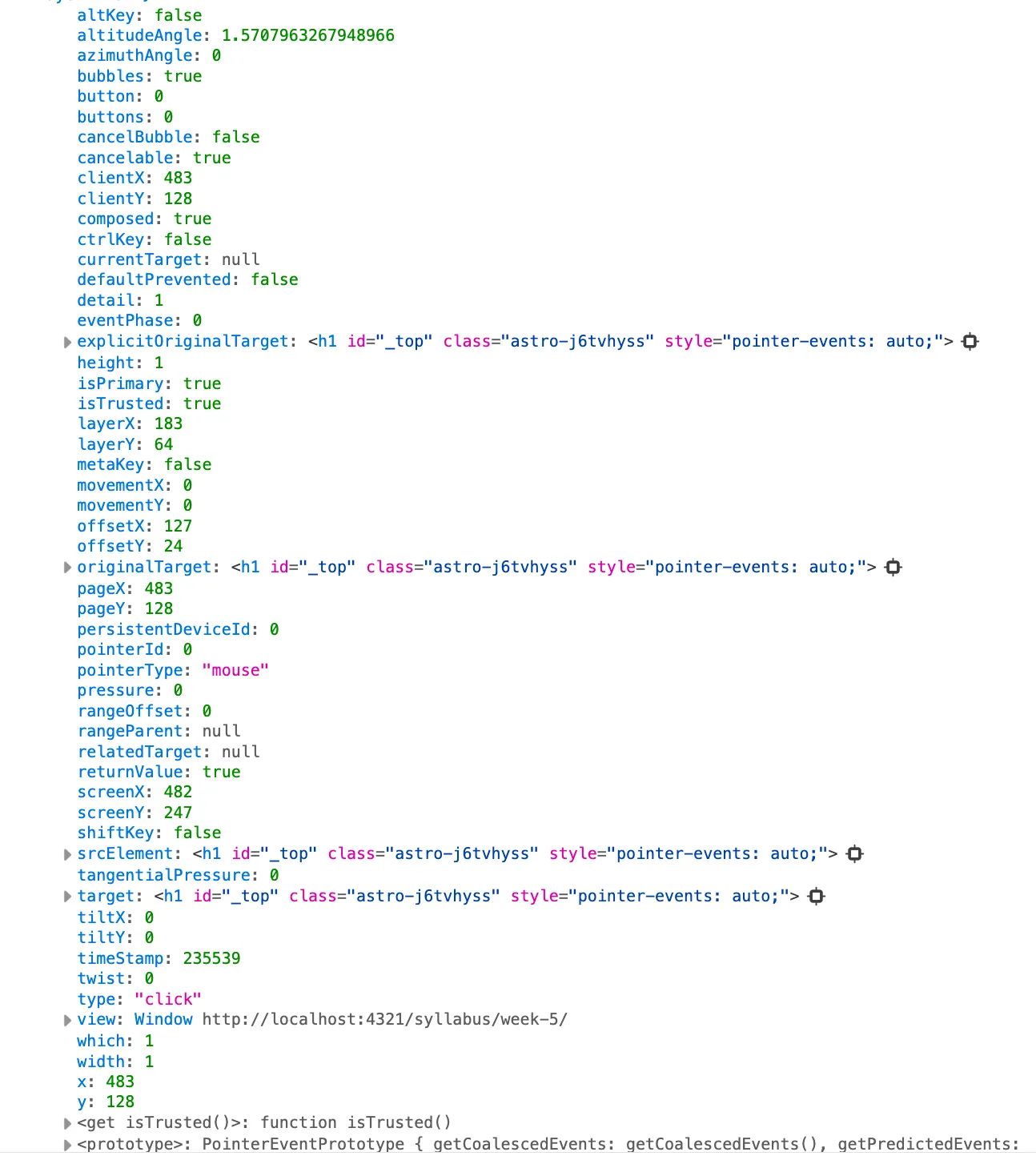
We are registering our our event listener with a callback function to accept the event object as a parameter. This callback function will be called when the event occurs, and the event object will contain information about the event, including the timestamps, the mouse position, the button pressed, and so much more.
p5.js hides all of this. You don’t see:
The addEventListener() method that registers callbacks
The event object with all its properties
The distinction between different event phases (capture, target, bubble)
The ability to prevent default behaviour or stop propagation
The need to specify which element you’re listening to
Instead, p5.js gives you mousePressed(), mouseX, mouseY, and mouseButton. Clean. Simple. Convenient.
But this abstraction determines what you can do. The abstraction chooses for you.
This is what we discussed last week with Fuller & Goffey: abstraction isn’t neutral. It encodes particular assumptions about what matters, what should be easy, what should be hidden. p5.js assumes you want simple interaction patterns for creative coding. If you want low-level control, you’re out of luck.
Moreover, the abstraction hides infrastructure. We never think about the browser’s event system, the operating system’s input handling, the hardware polling. It all becomes “magic”, and “asynchronous” work. Click happens, function runs. But magic obscures labour, obscures cost, obscures the materiality of computation.
Accessing event object in p5.js
1
functionsetup() {
2
createCanvas(400,400);
3
background(200)
4
}
5
6
// p5.js event listener
7
functionmousePressed(e) {
8
console.log("p5.js event object",e)
9
}
10
11
// Setting up our own event listener with vanilla js
12
document.addEventListener('click', function(e) {
13
console.log("Browser event object",e)
14
})
Run this. Click on the canvas. Notice what you can see in the console on the bottom (position, button, time between clicks) and what you can’t see (everything the browser knows but p5.js doesn’t expose).
This abstraction is useful, it lets you focus on creative work rather than event plumbing. But it’s also limiting. And it’s important to know what you’re giving up.
p5.js provides several event callbacks. Each represents a different kind of moment, a different signal the system can detect. Let’s examine them not just as technical functions, but as models of interaction, as assumptions about what kinds of human actions matter.
// mouseButton tells you which: LEFT, RIGHT, CENTER
4
}
5
6
functionmouseReleased() {
7
// Fires once when mouse button goes up
8
}
9
10
functionmouseClicked() {
11
// Fires when mouse is pressed AND released in same location
12
// This is a "complete" click. A gesture with intention
13
}
14
15
functionmouseMoved() {
16
// Fires continuously as mouse moves (when button NOT pressed)
17
// Can fire 60+ times per second
18
}
19
20
functionmouseDragged() {
21
// Fires continuously as mouse moves while the button IS pressed
22
}
23
24
functionmouseWheel(event) {
25
// Fires when scroll wheel moves
26
// event.delta tells you direction and amount
27
returnfalse; // prevents default page scroll
28
}
Notice the distinctions. mousePressed() is a moment. It’s a single event. mouseMoved() is continuous; it can fire dozens of times per second as you move. One is discrete, the other is a stream.
This matters. If mouseMoved() fires 60 times per second and you create a shape each time, you’ll create 60 shapes per second. That’s 3,600 per minute. That’s intentional for drawing, for continuous control, but you need to be aware of what “continuous” means.
Also notice what’s privileged: mouse movement, clicking, dragging. These are the gestures that are considered important. But what about hover? What about pressure (on devices that support it)? What about change in screen orientation? What about multi-touch? The API decides what kinds of interaction “count.”
// 'key' holds the character (if it's a character key)
4
// 'keyCode' holds the numeric code (for special keys)
5
6
if (key==='a') {
7
// lowercase 'a' was pressed
8
}
9
10
if (keyCode===ENTER) {
11
// special keys use keyCode
12
// p5 provides constants: ENTER, SHIFT, CONTROL, ALT, etc.
13
}
14
}
15
16
functionkeyReleased() {
17
// Fires once when key goes up
18
}
19
20
functionkeyTyped() {
21
// Fires for character keys only (not special keys)
22
// Useful when building text input
23
}
The distinction between keyPressed() and keyTyped() is telling. keyPressed() gives you everything including arrow keys, function keys, modifier keys. keyTyped() filters to only “typeable” characters—letters, numbers, punctuation. It’s pre-classifying input into “text” vs “control.” This is convenient if you want text input, but it’s also making assumptions about what you’re trying to do.
And notice: there’s no built-in way to detect key combinations. To check if someone pressed Ctrl+S, you’d need to track modifier key state yourself. p5.js doesn’t abstract that for you. The API has boundaries, it simplifies some things, ignores others.
Critical example: Interaction as surveillance
Let’s write code that makes visible how much the system is watching:
1
let events = [];
2
3
functionsetup() {
4
createCanvas(600,400);
5
textFont('monospace');
6
textSize(12);
7
}
8
9
functiondraw() {
10
background(240);
11
12
// Display last 20 events
13
let displayEvents = events.slice(-20);
14
for (let i = 0; i<displayEvents.length; i++) {
15
fill(0,map(i,0,displayEvents.length,50,255));
16
text(displayEvents[i],10,20+i*15);
17
}
18
19
// Instructions
20
fill(0);
21
text("Move, click, type—watch the system watch you",10,height-10);
22
}
23
24
functionmousePressed() {
25
events.push(millis() +": MOUSE_DOWN at ("+mouseX+","+mouseY+")");
26
}
27
28
functionmouseReleased() {
29
events.push(millis() +": MOUSE_UP");
30
}
31
32
functionmouseMoved() {
33
// Only log every 10th movement to avoid overwhelming
Run this. Interact with it. Move your mouse, click, type on your keyboard. Watch the log accumulate. Every movement, every click, every keypress, all recorded, timestamped, displayed. This is a tiny mirror of what every application does. Your interactions are events. Events are data. Data is surveillance.
We’re storing this in an array that grows without limit (in this particular example we’re not, but it is possible). Eventually, this will consume all available memory and crash. That’s not a bug in this code, it’s the reality of surveillance systems. Data accumulates. Storage isn’t infinite. At scale, surveillance requires massive infrastructure.
Reflection
The system captures your every interaction. In this example, we display it. In most applications, it’s sent to servers, stored in databases, analysed by algorithms. How does it feel to see your interactions logged? Does visibility make it better or worse?
Notice we’re only logging every 10th mouse movement to avoid overwhelming the display. Even with this filtering, it’s a lot. How much data is actually generated by “normal” computer use?
This example stores everything in memory. Real surveillance systems need databases, servers, energy to power them, physical infrastructure. What are the material costs of systems that record everything?
Callbacks fire in moments, they’re discrete events in time. But to create coherent behaviours, we need state - information that persists between events, that gives the system memory.
From Week 2, we know variables declared outside functions are global, meaning that they persist across function calls. This is crucial for event-driven programming:
The callbacks are momentary, they fire and finish. But the variables persist. clicks accumulates. lastClickTime remembers. The state bridges events, creating continuity across discontinuous moments.
This is memory. But memory isn’t free. Every variable requires storage. Every bit of state is data that must be maintained, that survives across events. At scale, this becomes database systems, session storage, cached data—all requiring infrastructure, energy, maintenance.
Critical example: State as history, history as burden
This is about accumulation and limits. We’re storing every shape’s position, size, colour, timestamp. Each shape is data. Data accumulates. Eventually, we hit a limit.
The limit here is arbitrary (1000 shapes), but the principle isn’t. Memory is finite. Storage has costs. At some point, you must decide: what to keep? What to discard? When to forget? As archives are created, information that’s left out is also erased. These are political questions disguised as technical ones. What to remember, what to forget? Who has a right to be remembered? Who doesn’t?
Facebook decides what posts to show you based on what it’s worth storing. Tiktok decides which activities are worth storing. YouTube decides which videos to cache. These are decisions about memory, about what’s worth remembering, about whose history matters.
Reflection
This sketch forces you to choose: keep recording or clear history. What does it feel like to erase? To replay? How is this different from the original experience of creating?
The replay is deterministic—same shapes, same positions. But the original was improvised, responsive, in time. Replay loses temporality. Is the replayed version the “same” as the original?
We implemented a hard limit (1000 shapes). Real systems have soft limits—they slow down, they compress data, they offload to disk. How do technical limits shape behaviour? Do you draw differently when you know memory is limited?
Let’s connect this back to Bernes and cybernetics. When you write event-driven code, you’re creating a feedback system:
User acts → System detects (event) → System responds (callback) → User perceives → User adjusts → System detects → …
This is circular causality. The system’s response shapes the user’s next action. The user’s action shapes the system’s next response. There’s no clear starting point, no linear sequence. Just a loop of feedback and adjustments.
This is what cyberneticians called a “feedback loop.” And it’s what Bernes shows was the conceptual foundation for both liberatory art practices and new forms of capitalist control.
In the 1960s, conceptual artists, poets, performance artists used cybernetic ideas to create “participatory” work. Systems that responded to audience input. Environments that adapted to users. Interactive art that blurred boundaries between creator and viewer. Perhaps the most famous of them all, Cybernetic Serendipity held at Institute of Contemporary Arts, here in London (also worth a visit if you haven’t been there yet; their bookstore is a must-visit).
Cybernetic Serendipity 1968
But simultaneously, corporations were using the same ideas to create “participatory” management. Quality circles where workers provided feedback. Self-managing teams. Suggestion boxes and engagement surveys. The language was the same: participation, feedback, system, process.
Bernes argues these two uses of cybernetics are inseparable. The art practices helped legitimise the management practices. The rhetoric of “participation” and “feedback” could mean liberation or exploitation depending on who controlled the system, who benefited from the loop.
When you create an interactive system, when you write callbacks that respond to events, you’re creating a feedback loop. But ask: who benefits? What’s being optimised? Whose agency is enhanced, whose is extracted?
Critical reflection
Consider the systems you’ve built this week:
When the system responds to your input, does that feel like empowerment (the system serves you) or like labour (you’re providing inputs the system needs)?
Every interaction generates data. In your sketches, that data stays local. But in most applications, interactions are logged, analysed, monetised. At what point does “interaction” become “data extraction”?
Feedback loops can be amplifying (small inputs create large effects) or dampening (the system resists change). Think about social media algorithms—they amplify engagement. What gets amplified? What behaviours does this encourage?
Pushing this a bit further, is electoral democracy just a feedback loop? What does participation mean in a democracy? With the act of voting, how is it different from a dropdown menu?
We’ve covered the foundation: events as cybernetic listening, callbacks as surrendered control, state as persistent memory, abstraction as political choice.
Every interface is an ideology made concrete. Every control is a decision about what matters.
Interface as ideology: p5.dom and mediated control
In Part 1, we looked at events—how systems wait, listen, respond. Now we turn to interfaces—the controls, widgets, elements that mediate between human intention and computational execution. Buttons. Sliders. Dropdowns. Text inputs.
These feel neutral, utilitarian. They’re just tools, right? Ways to control parameters, adjust values, make selections. But interfaces are never neutral. Every interface encodes assumptions about what actions are possible, what ranges are reasonable, what workflows are natural. An interface is a theory about how interaction should work, made concrete in controls and constraints.
When you create a slider that goes from 0 to 100, you’re not just enabling input, you’re also making 0 to 100 the “reasonable” range. When you provide three buttons, you’re saying these are the three options that matter. When you organize controls in a particular layout, you’re suggesting an order of operations, a hierarchy of importance.
Interfaces don’t reflect reality, they construct it. They determine what’s easy and what’s hard, what’s visible and what’s hidden, what users think to try and what never occurs to them. This makes interface design inherently political. It’s an exercise of power - the power to shape possibility, to define the terrain of action.

p5.js includes the p5.dom library (built-in, no import needed) which lets you create HTML interface elements programmatically. Unlike mouse and keyboard events which p5.js handles “automatically,” with DOM elements you’ll explicitly register callbacks. You’ll see the pattern clearly: create an element, attach a function, that function gets called when the element is interacted with.
Buttons seem straightforward, right? Click them, something happens. But buttons are never just triggers. They’re invitations to act, call-to-action, and the way they’re labeled, positioned, and designed shapes what we think we’re doing, and how we’re interacting.
1
let button;
2
let counter = 0;
3
4
functionsetup() {
5
createCanvas(400,400);
6
7
// Create a button
8
button=createButton('Click me');
9
button.position(20,420); // below canvas
10
11
// Register callback - notice we pass the function, not call it
12
// meaning no parathesis () to the function
13
button.mousePressed(handleButtonClick);
14
}
15
16
functiondraw() {
17
background(220);
18
19
fill(0);
20
textAlign(CENTER,CENTER);
21
textSize(32);
22
text(counter,width/2,height/2);
23
}
24
25
functionhandleButtonClick() {
26
// This is our callback
27
// The button will call it when clicked
28
counter++;
29
console.log("Button clicked. Counter:",counter);
30
}
Look at the syntax: button.mousePressed(handleButtonClick). We’re passing the function handleButtonClick as a value. Not calling it (which would be handleButtonClick()), but passing it; giving the button a reference to our function so it can call it later.
This makes the callback pattern explicit. We’re handing control to the button. We’re saying “when you’re clicked, call this.” The button decides when. We’ve surrendered control. We define the function, and what should happen, but we don’t control when it happens. The event does.
Critical questions:
The button says “Click me”. An imperative, a command. What if it said “You may click if you choose”? Or “Button #1”? The language shapes the interaction. Buttons don’t just do things, they tell us what to do. As artists and developers, we define the language our audiences are going to see.
We positioned it at 420 pixels. Just below our 400-pixel-tall canvas. This “feels” natural. But why? Because we’ve learned that controls go “below” or “to the side” of the main content. This is learned behaviour, not inherent. What if controls were in the middle? Or randomly placed? Would that change how we think about them?
Every click increments a counter. The button does the same thing every time. But what if it didn’t? What if the tenth click did something different? Would that feel like a trick? A surprise? At what point does consistency become constraint?
Sliders feel more sophisticated than buttons, they offer continuous control, fine adjustment, exploration of a range. But sliders are profoundly constraining. They define minimum and maximum values. They suggest a linear relationship between position and value. They make some ranges “normal” and others impossible.
1
let slider;
2
let circleSize;
3
4
functionsetup() {
5
createCanvas(400,400);
6
7
// createSlider(min value, max value, default start value, steps of change)
8
slider=createSlider(10,200,50,1);
9
slider.position(20,420);
10
}
11
12
functiondraw() {
13
background(220);
14
15
// Read the slider's current value
16
circleSize=slider.value();
17
18
// Draw circle
19
fill(100);
20
noStroke();
21
circle(width/2,height/2,circleSize);
22
23
// Display value
24
fill(0);
25
textAlign(CENTER);
26
text('Size: '+circleSize,width/2,height-20);
27
}
This feels empowering. Move the slider, see the change, explore the range. But notice what’s fixed:
Minimum is 10, maximum is 200: Why these values? I chose them. They seem “reasonable.” But they’re arbitrary. What if you want size 5? Size 300? The slider says no. The interface has decided what’s reasonable for you.
Step is 1: You get discrete integer values. But what if you wanted 50.5? Or 50.123? The slider has quantised your control.
Linear mapping: Moving the slider 10 pixels changes the size by the same amount regardless of where you start. But what if the relationship should be exponential? Logarithmic? The slider assumes linearity.
This is parametric control. You’re not directly manipulating the size, you’re adjusting a parameter that determines the size. There’s a layer of translation. And that translation embeds assumptions.
Critical example: Making constraints visible
1
let slider;
2
let requestedSize;
3
let actualSize;
4
5
functionsetup() {
6
createCanvas(400,400);
7
8
slider=createSlider(10,200,50,1);
9
slider.position(20,420);
10
11
textAlign(LEFT);
12
}
13
14
functiondraw() {
15
background(220);
16
17
requestedSize=slider.value();
18
19
// Arbitrarily constrain the actual size
20
// (simulating system limitations, memory constraints, etc.)
21
actualSize=constrain(requestedSize,20,150);
22
23
// Draw
24
fill(100);
25
noStroke();
26
circle(width/2,height/2,actualSize);
27
28
// Show the discrepancy
29
fill(0);
30
text('Slider says: '+requestedSize,20,30);
31
text('System allows: '+actualSize,20,50);
32
33
if (requestedSize!==actualSize) {
34
fill(255,0,0);
35
text('REQUEST DENIED',20,70);
36
text('System constrained your input',20,90);
37
}
38
}
Run this. Move the slider to its extremes. Watch the system override you. The slider says 10, but the system enforces 20. The slider says 200, but the system caps at 150.
This happens constantly in real interfaces. You request a file size, the system says “too large.” You try to allocate memory, the system says “not available.” You attempt an action, the system says “permission denied.”
The interface suggests possibility, but the system behind it has its own constraints, technical limits, policy restrictions, access controls. The interface becomes a site of negotiation between your intention and systemic constraints.
Reflection:
How did it feel when the system overrode your input? Frustrating? Expected? At what point does a system helping you (preventing “unreasonable” values) become a system controlling you?
Most interfaces hide these constraints until you hit them. This interface makes them visible. Is visibility better? Or is it just making you conscious of your powerlessness?
Think about systems where your input is constrained: credit limits, data caps, rate limits. The interface lets you request, but the system decides if you get. Who sets these limits? Who benefits from them?
Dropdowns (select menus) let users choose from a predefined set of options. This feels like agency—“I can choose!”—but it’s actually radical constraint. You can only choose what’s been listed. The interface has already foreclosed all other possibilities.
1
let dropdown;
2
let selectedShape;
3
4
functionsetup() {
5
createCanvas(400,400);
6
7
// Create select menu
8
dropdown=createSelect();
9
dropdown.position(20,420);
10
11
// Add options (these are the ONLY options)
12
dropdown.option('circle');
13
dropdown.option('square');
14
dropdown.option('triangle');
15
16
// Set default
17
dropdown.selected('circle');
18
19
// Register callback for when selection changes
20
dropdown.changed(handleShapeChange);
21
22
// Initialize
23
selectedShape='circle';
24
}
25
26
functiondraw() {
27
background(220);
28
29
fill(100);
30
noStroke();
31
32
// Draw based on selection
33
if (selectedShape==='circle') {
34
circle(width/2,height/2,100);
35
} elseif (selectedShape==='square') {
36
rectMode(CENTER);
37
square(width/2,height/2,100);
38
} elseif (selectedShape==='triangle') {
39
triangle(width/2-50,height/2+43,
40
width/2+50,height/2+43,
41
width/2,height/2-43);
42
}
43
}
44
45
functionhandleShapeChange() {
46
// Callback fires when dropdown changes
47
selectedShape=dropdown.value();
48
console.log("Shape changed to:",selectedShape);
49
}
Three shapes. That’s it. You can’t choose pentagon. You can’t choose star. You can’t choose “a shape I’ll draw myself.” The interface has decided that circle, square, triangle are the relevant options for you. That’s it.
This pattern is everywhere. Forms that ask your gender with only a binary choice. Nationality dropdowns that list only UN-recognized states. Product filters that categorise in particular ways. Every dropdown is a classification system. A decision about what categories matter, what fits where, what’s possible at all. Decisions that are made on behalf of us, some of which exclude some of us.
Critical example: The tyranny of categories
1
let genderDropdown, ageDropdown;
2
let genderText, ageText;
3
4
functionsetup() {
5
createCanvas(600,300);
6
textAlign(LEFT);
7
8
// Gender dropdown - limited categories
9
createP('Gender:').position(20,320);
10
genderDropdown=createSelect();
11
genderDropdown.position(90,335);
12
genderDropdown.option('Male');
13
genderDropdown.option('Female');
14
// Notice what's missing: non-binary, genderfluid, prefer not to say...
15
genderDropdown.changed(updateDisplay);
16
17
// Age dropdown - arbitrary brackets
18
createP('Age:').position(200,320);
19
ageDropdown=createSelect();
20
ageDropdown.position(250,335);
21
ageDropdown.option('18-24');
22
ageDropdown.option('25-34');
23
ageDropdown.option('35-44');
24
ageDropdown.option('45+');
25
// Why these brackets? Why is 45+ a single category?
26
ageDropdown.changed(updateDisplay);
27
28
// Initialize
29
genderText="Please select";
30
ageText="Please select";
31
}
32
33
functiondraw() {
34
background(240);
35
36
fill(0);
37
text("You must fit into our categories:",20,30);
38
text("Gender: "+genderText,20,60);
39
text("Age: "+ageText,20,90);
40
41
fill(150);
42
textSize(12);
43
text("(Notice what options you're NOT given)",20,140);
44
text("(Notice how the categories reflect assumptions)",20,160);
45
text("(Notice who doesn't fit)",20,180);
46
text("(Notice the violence in categorisation)",20,200);
47
}
48
49
functionupdateDisplay() {
50
genderText=genderDropdown.value();
51
ageText=ageDropdown.value();
52
}
This is violence disguised as UX. “Please select your gender” sounds polite. But if your gender isn’t listed, you’re being told you don’t exist. That you must choose a wrong category or be excluded.
Every categorisation system is political. It decides what distinctions matter. What gets grouped together. Who gets counted and how. Demographic dropdowns in forms aren’t neutral data collection, they’re acts of classification that include some people and erase others.
Reflection:
Think about forms you’ve filled out. Times when your answer wasn’t an option. How did you respond? Choose the “closest” wrong answer? Choose “other”? Give up? What does it mean when systems force you to misrepresent yourself to participate?
Age brackets like “18-24” and “45+” are incredibly common. Why? Because they’re “useful for marketing.” Useful to whom? What if the brackets were different? Would that change who’s targeted, who’s valued, who’s ignored?
Some progressive forms now include “prefer not to say” or “other” with a text field. Is that better? Or does it just create a catch-all category for “people who don’t fit”?
DOM elements are HTML - they exist outside your canvas. You need to position them explicitly:
1
// Absolute positioning
2
button.position(100, 50);
3
4
// Relative to canvas
5
button.position(20, height+20); // 20px below canvas
6
7
// Styling with CSS
8
button.style('background-color', '#FF0000');
9
button.style('color', 'white');
10
button.style('padding', '10px 20px');
11
button.style('font-size', '16px');
12
button.style('border', 'none');
13
button.style('border-radius', '5px');
14
15
// Or apply a CSS class
16
button.class('my-button-class');
Positioning isn’t neutral. Put controls on the left, and you privilege left-to-right readers. Put them below, and you suggest a hierarchy (canvas important, controls secondary). Put them inside the canvas, and you make them compete for attention with content.
Styling isn’t neutral either. Red buttons suggest urgency or danger. Big buttons suggest importance. Disabled (greyed out) buttons communicate powerlessness—you can see the option but can’t use it.
Critical example: Interface as obstacle course
1
let button1, button2, button3;
2
let clicks = [0, 0, 0];
3
4
functionsetup() {
5
createCanvas(600,400);
6
7
// Button 1: Easy to click - big, obvious, accessible
text('Notice which button you clicked more',width/2,height-60);
50
text('Design is never neutral',width/2,height-40);
51
text('Interfaces direct behaviour',width/2,height-20);
52
}
This makes visible what’s usually invisible: interface design is behaviour design. The big, green, easy button gets clicked more. Not because it’s “better,” but because it’s designed to be clicked. The tiny, low-contrast, moving button is designed to be avoided.
Every interface does this, just less obviously. Facebook makes “like” easy (one click) but “unlike” harder (must confirm). Unsubscribe links are always tiny and hidden. “Accept cookies” is a big button; “manage preferences” is small text. These aren’t accidents, they’re intentionally designed friction.
How did it feel clicking the easy button vs the hard one? Did you even try clicking the impossible one? Interface design shapes not just what you can do but what you think to try.
Think about interfaces you use daily. What actions are made easy? What’s made hard? Whose interests does this serve?
Accessibility isn’t just about making things usable—it’s about who’s included in “usable.” A tiny, low-contrast button is “unusable” for people with vision problems, motor control issues, or just older adults. When interfaces make things hard, they’re making people’s participation conditional.
Now we enter the sonic. If events are about systems listening, and interfaces are about mediating control, then sound is where these abstractions become material, corporeal, unavoidable. Sound enters your body as vibration. You can close your eyes, but you cannot close your ears. Sound refuses the distance that visual media permit. It insists on presence.
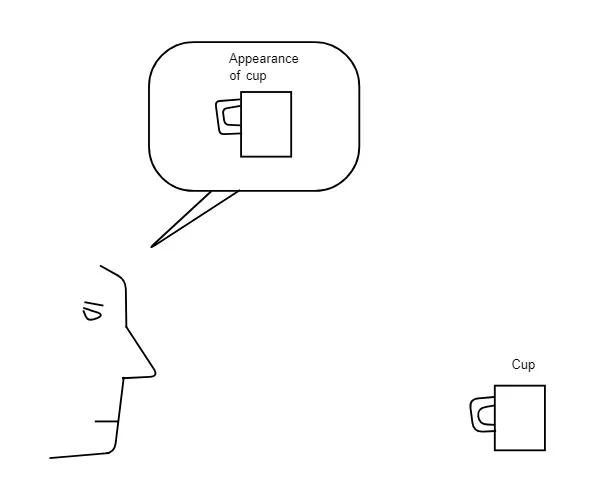
Salomé Voegelin opens Listening to Noise and Silence with a radical claim: listening is not passive reception, it’s active production. When you listen, you’re not just receiving sound waves that exist “out there.” You’re generating the sonic world through attention, through the act of listening itself.
“It is perception as interpretation,” Voegelin writes, “that knows that to hear the work/the sound is to invent it in listening to the sensory material rather than to recognise its contemporary and historical context.” Listening is invention. The sound you hear is not the sound that exists, it’s the sound you produce through listening.
This is phenomenology: perception constitutes reality rather than merely receiving it. But Voegelin pushes it further—listening is also political. What you choose to listen to, how you listen, what you dismiss as “noise”—these are political acts. “All sensing becomes ethical. All aesthetics become political.”
Before we make sounds with code, we need to understand: there is no such thing as neutral sound. Every sound carries history, context, power relations. Every act of listening is a positioning—an ethical and political stance toward the world.
Cybernetics and information theory gave us the distinction between signal (wanted information) and noise (unwanted interference). This sounds technical, objective. But it’s profoundly political.
Who decides what’s signal and what’s noise?
Music is signal. Traffic is noise. But why? Because music is intentional, authored, commodified. Traffic is accidental, collective, unavoidable. Music requires silence to be heard. Noise refuses that requirement.
Think about acoustic environments. Whose sounds are respected? Classical music in a concert hall—everyone must be silent. A mosque’s call to prayer—a signal to believers, “noise” to complaints. Boomboxes on public transport - one person’s music, another’s intrusion. Gentrification often begins with noise complaints and targeting working-class soundscapes, minoritised music practices, collective uses of sonic space.
Voegelin discusses noise artist Merzbow, whose extreme volume and harsh frequencies “hold the listener hostage.” You cannot ignore Merzbow. You cannot aestheticize it into pleasant background. Noise insists. And in insisting, it reveals the violence implicit in demands for order, clarity, silence. “Please keep your voice down.” “Turn that off.” “You’re disturbing others.” These are disciplinary statements masked as courtesy.
Silence, too, is political. John Cage famously demonstrated there’s no such thing as silence in an anechoic chamber; he heard his nervous system and blood circulation. But beyond this perceptual truth, silence is distributed unequally. Who gets to demand silence? Who must be silent? Libraries enforce silence—but so do prisons, so do colonial schools forcing Indigenous children not to speak their languages, so does “be quiet” directed at children, workers, the colonised.
When we make sound with code, we’re entering these politics. Synthesis gives us “clean” sounds, free from acoustic messiness. But that cleanliness is ideological — it privileges mathematical purity over material reality. The tuning systems we use (A4 = 440Hz, 12-tone equal temperament) are cultural choices made universal. Every technical decision is political.
Reflection
Before we code, consider:
Think about your daily acoustic environment. What sounds do you notice? What do you ignore? What are you supposed to ignore (air conditioning, traffic, machinery)? What happens when you deliberately listen to “background” noise?
Who gets to make noise? Who gets complained about? Think about music volume, car bass, renovation noise, children playing. How does race, class, age determine whose sounds are tolerated?
Voegelin argues listening is an ethical act—you’re actively generating the sonic world through attention. What does it mean to listen ethically? To refuse to dismiss sounds as “just noise”?
An oscillator generates a repeating waveform, a signal that oscillates at a specific frequency. This is the foundation of synthesis. But oscillators don’t exist in nature. They’re mathematical abstractions—perfect, repeating, predictable. Real acoustic instruments are messy, full of transients, noise, imperfection. Synthesis is clean. Almost too clean.
p5.sound provides four basic waveforms. Let’s understand them through trigonometry—the mathematics of cycles, circles, repetition.
The sine wave is “pure tone”. A single frequency with no overtones. It’s what you get from the mathematical sine function, which describes circular motion:
1
let osc;
2
3
functionsetup() {
4
createCanvas(800,400);
5
6
// Create oscillator
7
osc=newp5.Oscillator('sine');
8
osc.freq(220); // A3 note
9
osc.start();
10
osc.amp(0); // silent until we want it
11
12
textAlign(CENTER);
13
}
14
15
functiondraw() {
16
background(240);
17
18
// Visualize sine wave using trigonometry
19
stroke(0);
20
strokeWeight(2);
21
noFill();
22
23
beginShape();
24
for (let x = 0; x<width; x++) {
25
// Map x position to angle (0 to 4π for two cycles)
26
let angle = map(x,0,width,0,TWO_PI * 2);
27
28
// Sine gives value between -1 and 1
29
let y = sin(angle);
30
31
// Map to canvas coordinates
32
y=map(y,-1,1,height*0.75,height*0.25);
33
34
vertex(x,y);
35
}
36
endShape();
37
38
// Control with mouse
39
let myFreq = map(mouseX,0,width,100,1000);
40
let myAmp = map(mouseY,0,height,0,0.3);
41
42
osc.freq(myFreq);
43
osc.amp(myAmp,0.05); // 0.05 second ramp to avoid clicks
The sine function describes smooth oscillation, like a point moving around a circle, projected onto a line. It’s the essence of periodic motion, stripped of everything else.
But this purity is ideology. Real sounds aren’t pure tones. An acoustic instrument playing A220 produces A220 plus overtones (multiples of the fundamental frequency that give the sound its timbre, its character). A violin and a flute playing the same note sound different because of overtones.
Synthesis gives you pure tones. Clean. Mathematical. Controllable. But also stripped of acoustic reality. This is the sound of rationality, of enlightenment, of science; sound reduced to frequency and amplitude, freed from the messy materiality of vibrating strings or columns of air.
Is this liberation (from physical constraints) or impoverishment (loss of richness)?
These waveforms are building blocks. In vintage synthesisers, you’d select a waveform, then shape it with filters and envelopes. Each waveform has a character, a sonic signature. But they’re all idealised—mathematical shapes that don’t exist acoustically.
Reflection:
Sine waves sound “pure” but also “electronic,” “cold,” “inhuman.” Square waves sound “retro,” “8-bit,” nostalgic for early computing. These associations aren’t natural—they’re learned from cultural context. What does it mean that “electronic” and “inhuman” feel synonymous?
Acoustic instruments produce complex, time-varying spectra. Synthesis produces stable, predictable waveforms. Does this make synthesis “unnatural”? Or does it reveal something essential about sound freed from physical constraints? Both?
You can create any waveform by adding sine waves at different frequencies and amplitudes (Fourier synthesis). Every complex sound is really just many simple sounds combined. Is this reductionist brilliance or reductionist violence?
A waveform describes the shape of vibration. But music isn’t just steady tones—it’s about how sounds begin, evolve, end. That’s what envelopes control.
The ADSR envelope comes from analog synthesisers in the 1960s-70s. It models Western musical articulation—notes with attacks (piano hammer strike, trumpet tongue), sustains (held organ note), releases (resonance decay). But this is a particular cultural model.
What about sounds that swell gradually with no clear attack? What about sounds that don’t “sustain” at all but continuously evolve? What about non-Western music that doesn’t think in terms of discrete “notes” with beginnings and endings?
ADSR is useful. But it’s also normative—it teaches you to think about sound in particular ways, to expect particular behaviours. It makes some gestures easy (percussive attacks, sustained pads) and others unthinkable.
Reflection:
ADSR makes certain sounds easy (piano-like notes, drum hits) and others hard (continuously evolving drones, unpredictable bursts). How does this shape what music you’re likely to make?
Try to describe the envelope of: a cicada’s call, a door creaking open, a crowd murmuring. Does ADSR fit? What’s lost in translation?
The names—Attack, Decay, Sustain, Release—are militaristic, violent. Attack. This is the language of weapons, of aggression. Why is this the metaphor for how sound behaves over time?
Reverb adds space. Dry (no reverb) sounds close, intimate, in your head. Reverb makes sound feel distant, in a room, in a cathedral, in a canyon. It’s computational architecture - you’re building acoustic space without acoustic materials.
But which spaces? Concert halls, churches, studios; these are specific cultural spaces with histories. Reverb on pop vocals sounds “professional” because that’s the convention. Reverb on field recordings sounds “artistic.” These are learned associations.
Delay creates rhythm from single events. It’s time made audible. And like reverb, it’s cultural: slapback delay on rockabilly vocals, dub delay on reggae, ping-pong delay on electronic music. Each is a genre marker, a historical reference.
text('Move mouse to sculpt frequency content',20,height-20);
32
}
Sweeping a filter is expressive, it’s how you get “wah” sounds, how you make bright or dark timbres. But it’s also violence: you’re removing frequencies, silencing parts of the spectrum. What’s “filtered out” is deemed unwanted, unnecessary, noise.
Also available: p5.HighPass() (removes lows), p5.BandPass() (only a frequency range passes through). Each is a choice about what matters in the sonic spectrum.
Reflection:
Effects like reverb and delay are “artificial”, they’re simulations of acoustic phenomena. But they’ve become so standard that music without effects sounds “wrong.” When does simulation become reality?
Filters make some frequencies “important” (those that pass through) and others “noise” (those that are removed). Who decides? The filter designer, the musician, cultural convention?
Digital effects are “clean” and “perfect”, analog effects had noise, distortion, unpredictability. We often add these imperfections back digitally. Why? What are we nostalgic for?
Sequencing and loops: patterns, repetition, machines
To make music (rather than just sounds), we need patterns in time. From Week 3, we know loops are ideological, they’re automate and repeat without fatigue.
let stepDuration = 60000 / bpm / 2; // 2 steps per beat
25
26
if (now-lastStepTime>=stepDuration) {
27
if (pattern[step] ===1) {
28
playNote();
29
}
30
step= (step+1) %pattern.length;
31
lastStepTime=now;
32
}
33
}
34
35
// Draw pattern
36
let stepWidth = width / pattern.length;
37
for (let i = 0; i<pattern.length; i++) {
38
if (i===step&&playing) {
39
fill(255,200,0); // current step
40
} elseif (pattern[i] ===1) {
41
fill(100);
42
} else {
43
fill(240);
44
}
45
stroke(0);
46
rect(i*stepWidth,50,stepWidth-2,100);
47
}
48
49
// Instructions
50
fill(0);
51
noStroke();
52
text('Click steps to toggle. SPACE to play/stop',width/2,30);
53
text(playing?'Playing':'Stopped',width/2,180);
54
}
55
56
functionplayNote() {
57
osc.freq(220);
58
osc.amp(0.2,0.01);
59
osc.amp(0,0.05,0.05);
60
}
61
62
functionmousePressed() {
63
let stepWidth = width / pattern.length;
64
if (mouseY>50&&mouseY<150) {
65
let clicked = floor(mouseX / stepWidth);
66
if (clicked>=0&&clicked<pattern.length) {
67
pattern[clicked] =1-pattern[clicked];
68
}
69
}
70
}
71
72
functionkeyPressed() {
73
if (key==='') {
74
playing=!playing;
75
if (playing) {
76
step=0;
77
lastStepTime=millis();
78
}
79
}
80
}
This is algorithmic music. You’re not playing notes, you’re designing a system that generates patterns. The loop runs forever, perfectly timed, never tired. This is the sound of automation, of machines, of late capitalism’s dream of labour-free production.
But notice: you can change the pattern. Click steps on/off. The system is deterministic but mutable. Is this agency? Or just parametric control over a machine that doesn’t care?
Part III: Synthesis: Feedback loops as political instruments
We’ve examined events (systems listening), interfaces (mediated control), and sound (material politics). Now we bring them together—creating systems where DOM controls shape sound parameters, where interaction becomes feedback, where the cybernetic loop closes.
This isn’t just a synthesiser, it’s a meditation on control. The sliders don’t give you direct control. They give you parametric control within predefined ranges. The interface has decided:
Attack can be 1-1000ms (why not 0? why not infinite?)
Filter can be 100-5000Hz (why these limits?)
Reverb is 0-100% (what does percentage even mean here?)
And notice: you can’t control decay, sustain, or release. Those are fixed. The interface has decided they don’t matter, or that exposing them would be “too complex.” Every interface is a curatorial act: selecting what’s important, hiding what’s deemed unnecessary.
Reflection:
How does it feel to play this? Empowering (you can adjust parameters!) or constraining (only these parameters, only these ranges)?
The keyboard is in C major. You can’t play chromatic notes, microtones, or non-Western scales. The interface has made musical assumptions. What music is excluded by these choices?
You’re improvising, but within a system someone else designed. Is this improvisation or execution? Whose creativity matters—yours or the system designer’s?
Example: Generative soundscape with ideological controls
text('"Harmony" means following the harmonic series - a "natural" tuning system',20,20);
99
text('But what\'s natural? This is still a Western musical assumption.',20,35);
100
text('"Chaos" means deviation from pattern. But whose order defines chaos?',20,50);
101
text('These sliders have names that carry ideology. Language is never neutral.',20,65);
102
}
Critical analysis:
This system generates sound algorithmically. You don’t play notes—you adjust system behaviours. But look at the slider names:
Density: Neutral-sounding, quantitative. But it’s really about “how many voices deserve to be heard.” More density = more polyphony = more democracy? Or more chaos = less legibility?
Harmony: Named after a Western music concept. “Harmonic” = good, pleasing, ordered. But the harmonic series is just one tuning system among many. We’ve naturalized it.
Chaos: The opposite of “harmony.” Chaos = bad, uncontrolled, noisy. But chaos theory shows us complex order in apparent randomness. Naming this slider “chaos” suggests disorder is something to be minimized.
These aren’t just technical parameters—they’re value-laden terms that shape how you think about the system. Interface language is political.
Reflection:
Try maximizing “chaos” and minimizing “harmony.” Does this sound “worse”? Or just different? Who taught you that harmony is better than chaos?
This system is deterministic—same slider positions = same sound (approximately). But it feels generative, alive. Is this an illusion? At what point does complexity become agency?
You’re controlling high-level behaviours, not individual notes. Is this more “creative” (meta-composition) or less (removed from direct control)? Both?
Let’s synthesise the theory. Jasper Bernes argues how cybernetic concepts like feedback, participation, self-organization were taken up by both liberatory art practices and new forms of capitalist control. Artists used them to create participatory work that broke down hierarchies. Corporations used them to make workers self-managing, self-disciplining, self-exploiting.
The language was the same: participation, feedback loops, input/output, systems thinking. But the outcomes were opposite, or were they? Bernes argues the art practices helped legitimise the management practices. They made “participation” and “feedback” sound progressive, even when they were mechanisms of control.
When you create interactive systems, you’re in this double bind. You’re creating feedback loops. But feedback can empower or extract. It can give agency or demand labour. Every time a user clicks, types, adjusts a slider — that’s work. Work the system needs. Work that generates data. Who benefits?
Salomé Voegelin adds another dimension: listening is not passive, it’s active production. When you listen, you’re generating the sonic world through attention. And that makes listening political. What you listen to, how you listen, what you dismiss as noise—these are ethical and political acts.
When you create sound systems, you’re shaping listening. A sequencer trains people to hear in loops. A scale trains people to hear in particular intervals. An interface suggests particular modes of attention. You’re not just making sounds—you’re constructing listening subjects.
Live coding, which you’ll experience with your guest this week, makes all of this visible. The coder types → code executes → sound changes → audience responds (or the coder hears their own output) → coder adjusts → repeat. It’s simultaneous composition and performance. The feedback loop is the work.
But live coding also asks uncomfortable questions:
Is typing performance? (It doesn’t look or sound like performance — it’s assumed labour)
Is watching code scroll on a screen engaging? (For whom? Coders? Non-coders?)
When code crashes, is that failure or material? (Errors become part of the piece)
Who’s performing for whom? (Coder for audience? Audience for coder via response? Machine for all? Me for you every week in class?)
These aren’t just technical concepts, they’re models of interaction, control, listening, time. Every technical decision is cultural, political, historical. When you write mousePressed(), you’re not just detecting clicks, you’re entering into a cybernetic relationship where the system watches, waits, responds. When you create a slider, you’re not just enabling control, you’re constraining it, mediating it, shaping what’s thinkable. When you generate sound with sine waves, you’re not making “neutral” tones, you’re working with mathematical abstractions that carry ideologies about purity, control, rationality.
This week you’ve built systems that listen and respond. You’ve created interfaces that mediate control. You’ve generated sounds that enter bodies as vibration. But more importantly, you’ve started thinking critically about what these systems do — not just technically, but politically, culturally, ethically.
Your performance task is your chance to explore these ideas through doing. Not through getting it right, but through taking a risk. Not through pleasing an audience, but through being present in uncertainty. Not through demonstrating mastery, but through entering into dialogue with your tools, your materials, your own assumptions about what performance is.
Be brave, listen carefully, perform with intention, let failure be material, let the system surprise you, question everything, including these instructions.
See you back after the reading week with your performances.
Also, please make sure to go through Week 6’s material as well during the reading week.
Performances will take place on 13th November 14:00-17:00.
Please be prepared with your devices/laptops and any other materials you might need.
After reading week, you’re expected to return with a 4-minute live performance. This is not about creating a finished piece to present. It’s about performing a process, with all the uncertainty, risk, and presence that implies.
This is deliberately open-ended. But it must engage with this week’s themes: events, feedback, listening, liveness, the politics of interaction, the materiality of sound.
You are strongly encouraged to use p5.js for this performance, but you are free to use other tools you like, as long as they aid your performance.
Thinking prompts
(These are not instructions. They’re questions to sit with as you prepare. You don’t need to answer them explicitly, only let them guide your thinking:)
On liveness and presence:
What makes something “live”? Is it temporal (happening in the moment), corporeal (involving bodies), or relational (depending on witnesses)?
Can code be live? Is typing live? Is the code executing live? Is the sound generated live? Where does liveness actually occur?
If you perform the same code twice, is it the same performance? What’s the difference between replay and repetition?
How does liveness relate to risk? Is something only “live” if it might fail?
On performance and labour:
What does it mean to perform code? Is coding always performance, or only when watched? Is live streaming code performance?
Typing doesn’t look like performance - it looks like work. When does labour become performance? When does performance become labour?
If you read your code aloud, are you performing the code or performing reading? What if you read it as poetry? As instructions to yourself? As confession?
Who or what is your audience? People watching? The machine executing your code? Future you who’ll review the documentation? Yourself in the moment?
On sound, noise, and listening:
If you make sound, what kind of sound? Musical? Noisy? Textual (synthesised speech)? Ambient? Silence?
Voegelin argues listening is active production—you generate the sonic world through attention. Can you create a performance that makes listening itself the work? That requires active attention rather than passive consumption?
Can you perform silence? (Cage said there’s no such thing—what does it mean to perform nothing?)
What if the performance is uncomfortable? Loud? Harsh? Boring? Is discomfort valid? Is it violence?
On system, feedback, and agency:
Will you perform with the system or on the system? Is the computer your instrument, your collaborator, or your material?
Can you create a system that responds to you? To the room? To the audience? What kinds of feedback loops are possible?
What if the system evolves or degrades over 4 minutes? What does that transformation reveal about time, process, deterioration?
What if you perform failure—code that breaks, systems that crash, inputs that don’t work? Is failure part of the performance or breakdown of the performance?
On politics and ethics:
What are you making visible? What are you hiding? Every choice is curatorial—what do you choose to expose?
Whose aesthetics are you drawing from? Live coding has its own aesthetic conventions—projected code, algorave beats, glitch aesthetics. Do you adopt these? Subvert them? Ignore them?
What does your performance assume about the audience? That they’ll understand code? That they’ll listen? That they’ll sit still? That they’ll be able-bodied, sighted, hearing?
Can a performance be political without being didactic? Can it raise questions without providing answers?
On the event itself:
4 minutes is short. It’s one pop song. It’s long enough to develop an idea but not resolve it. What fits in 4 minutes?
Will it be repeatable? Fully improvised? Somewhere between? What’s the relationship between preparation and spontaneity?
How will you know when 4 minutes is up? Will you time it? Will you feel it? Will you ignore it?
Can you perform something that doesn’t feel like “performance” at all? Something quiet, undramatic, refusal-based?
You might:
Write code live that evolves over 4 minutes
Perform a pre-written system, adjusting parameters in real-time
Read code aloud as text, poetry, instructions, or ritual
Create a system that listens to the room and responds
Make something that breaks, glitches, or refuses to work
Perform only with the command line—no visuals, just text and sound
Do something durational—repetitive, meditative, exhausting
Collaborate with another person, with your computer, with chance
Create only sound, only visuals, only text, or nothing at all
Make something so quiet people have to lean in to hear
Make something so loud it’s uncomfortable
Refuse to perform—sit silently for 4 minutes and make the audience’s discomfort the work (although I encourage you perform something)
What’s required:
It happens in time (4 minutes maximum; shorter is fine)
It takes a risk (it might fail, might be uncomfortable, might surprise even you)
It engages with the themes (events, feedback, listening, liveness, performance)
You’re present (not just playing back a recording. There must be liveness somewhere)
What’s NOT required:
Technical perfection or sophistication
Sound (unless you want it)
Visuals (unless you want them)
Looking like “live coding” (that’s one approach, not the only approach)
Entertainment, pleasure, or comfort
This is about process, presence, and what it means to perform with/through/against code. Be brave. Be uncertain. Be present. Let the system surprise you. Let yourself surprise yourself.


 From
From  From
From