Welcome to Week 4. Over the past three weeks, we’ve been building a vocabulary: variables (containers for change), conditionals (decisions and categories), loops (repetition and time). This week, we encounter something more slippery, more ideological: the function.
A function is, at its most basic, a named sequence of instructions. It’s a way to package code into a reusable unit. You call it by name, it executes, and optionally returns a result. Simple, right?
But functions are never just technical conveniences. They are fundamentally about abstraction - about hiding complexity, creating interfaces, drawing boundaries between what you need to know and what you don’t. And abstraction is always political. It determines who has access to what, what gets made visible and what gets hidden, whose labour is acknowledged and whose is erased.
When you call circle(100, 100, 50), you don’t see the trigonometry that draws it, the pixels being set, the graphics pipeline processing it. The function circle() abstracts all of that away. This is convenient - you can draw circles without understanding Bézier curves. But it’s also a form of control - someone else decided what a circle is, how it should be drawn, what parameters it should take. The function is an interface, and every interface is an exercise of power.
The abstractions we inherit
We’ve been using p5.js functions all along: circle(), rect(), background(), fill(). These are abstractions that someone else built. Let’s look at them critically.
Consider circle(x, y, diameter). What does it hide?
The mathematical formula for a circle
The algorithm for rasterising curves into pixels
The graphics pipeline that actually renders it
The fact that it’s probably drawing many tiny line segments, not a true geometric circle
The computational cost (how many operations this takes)
The function gives you a clean interface: “draw a circle here, this big”. But underneath is complexity you don’t see.
This raises Højberg’s question: is circle() high-context or low-context? Does it give you clues about what it does and how it might fail? Or does it create assumptions that might be wrong? What if the circle is so large it goes off-canvas? What if the coordinates are negative? The function doesn’t tell you - you have to find out by trying, or by reading documentation (if it exists), or by looking at the source code (if you can find it).
Michael Murtaugh, in “Do (Not) Repeat Yourself”, examines the software engineering principle of DRY - Don’t Repeat Yourself. The industry mantra goes: if you’re writing the same code twice, abstract it into a function. Write it once, use it everywhere. This is supposedly about efficiency, about good practice, about clean code. But Murtaugh asks us to stop and think: Whose efficiency? What kind of labour does DRY privilege? What is lost when we eliminate repetition?
Murtaugh reveals that repetition is not waste - it’s how we learn. “There can be a tangible pleasure in quickly typing out the template of a familiar programming structure. Far from celebrating the birth of a unique new creation from scratch, it is rather a joyful expression of the pattern that increasingly becomes physically embodied in the programmer him/herself.” The act of typing the same pattern, feeling it in your fingers, is how skill develops. The push to eliminate repetition through abstraction actually eliminates the very process by which programmers develop craft.
Meanwhile, Simon Højberg, in “Code for people”, argues that we’ve been focused on the wrong audience. Code isn’t for computers - it’s for the programmers who will read it, maintain it, modify it. “Programmers, not machines, are the primary audience of our work.” But design principles like DRY, SOLID, KISS - these are ego-boosting exercises, “Principle Bingo” where we check boxes to feel clever. They don’t actually help the next person understand what the code does or why.
Højberg describes “low-context codebases” as swamps - hostile environments where every function call “stings like mosquitoes” and side effects ambush you “like venomous snake bites.” Abstraction, when done poorly or dogmatically, creates these swamps. Functions become black boxes that hide not just implementation details but intent, context, history. The next programmer - often your future self - becomes lost.
When we write a function, we’re not just organising code. We’re making claims about what matters, what should be grouped together, what should be separated, what should be visible and what should be hidden. These aren’t neutral technical choices - they’re choices about knowledge, power, and who gets to understand.
This week, we’re going to learn how to write functions. But more importantly, we’re going to question them. What do they hide? What do they reveal? For whom are we abstracting? And what happens when we break abstraction open and look at what’s underneath?
Abstraction in computing is often presented as purely beneficial - it manages complexity, enables reuse, creates modularity. But abstraction is also about distance. It’s about creating layers between you and the material reality of computation.
When you use a function like loadImage(), you’re abstracted away from:
The file system operations that load the file
The format-specific decoding (JPEG compression, PNG transparency)
The memory allocation for the pixel data
The colour space conversions
The error handling if the file doesn’t exist
All of this is hidden. And that hiding is useful - it would be exhausting to deal with all that every time you want to show an image. But it also means you don’t understand how images work, how they’re stored, how they’re compressed, what data they contain beyond what’s visible.
This is what Nathan Ensmenger calls “The Black Box and the White Box” in software history - functions are black boxes. You put inputs in, you get outputs out, but you don’t see the mechanism. And increasingly, as software becomes more abstract, more layered, more complex - we all work with black boxes we don’t understand.
But whose understanding matters? Højberg points out that code is designed for an audience, but we often forget who that audience is. It’s not the computer. It’s not even primarily yourself in the moment of writing. It’s the programmer who comes after - who needs to fix a bug, add a feature, understand what’s happening. When we optimise for our own cleverness, when we abstract to feel smart, we create swamps for others to navigate.
Murtaugh goes further. He argues that the very separation of “code” from “practice” is harmful. Bad code is said to have a “smell” - as if the code itself, independent of programmers, is the problem. But this displaces responsibility. It makes code seem like an autonomous thing with its own desires, rather than the product of human labour under particular conditions. When we talk about “code smells”, we avoid talking about overwork, about impossible deadlines, about systems that extract maximum productivity from programmers’ bodies.
And make no mistake - programming is bodily labour. Murtaugh describes the physical exhaustion of intense coding sessions: the loss of language, the inability to create meaningful names, the smells (is it the rubbish bin or is it me?), the need for extreme hobbies like rock climbing just to escape the intensity. This is not immaterial mental work. This is labour that consumes bodies.
Discussion questions
Before we write any functions, discuss:
Think about interfaces you use daily (apps, websites, physical objects). What do they hide from you? What do they make visible? Is that hiding empowering or disempowering? Who decided what you get to see?
Murtaugh argues that repetition is essential for learning and skill development. Can you think of examples from your own life where repetition wasn’t waste, but was how you learned something? What would it mean to value repetition in code?
Højberg says design principles like DRY are “Principle Bingo” - checking boxes to feel clever without actually helping anyone understand the code. Have you experienced this? When has following a “best practice” made things worse instead of better?
When you call a function like image() or circle(), you’re trusting that it does what it says. But how do you know? Who wrote it? What assumptions did they make? What biases might be encoded in their implementation? What if the function name lies?
Think about “efficiency” - what does it mean? Efficient for whom? At what cost? When Amazon’s algorithms optimise delivery routes, they’re efficient - but efficient at the cost of driver wellbeing. What would it mean to write “inefficient” code that prioritises human understanding over machine efficiency?
We’ve already been using functions this whole time. Every time you write circle(), background(), random() - you’re calling functions that p5.js provides. But what does it mean to define our own?
A function is a named block of code that:
Can be called by name
Can receive inputs (parameters)
Executes a sequence of instructions
Can return an output
Here’s the basic syntax:
1
functionmyFunction() {
2
// code goes here
3
}
Let’s start simple. Remember last week when we drew a grid of circles? We had to write the nested loop every time. What if we could package that into a function?
1
functiondrawGrid() {
2
for (let x = 0; x<10; x++) {
3
for (let y = 0; y<10; y++) {
4
circle(20+x*40,20+y*40,30);
5
}
6
}
7
}
8
9
functionsetup() {
10
createCanvas(400,400);
11
background(220);
12
drawGrid(); // call our function
13
}
Now instead of writing the nested loop every time, we just call drawGrid(). We’ve abstracted the grid-drawing logic into a named unit. This is the promise of functions: reusability, organisation, clarity.
But notice what we’ve hidden. When someone reads drawGrid(), they don’t see:
How many circles are drawn
What size they are
How they’re spaced
That it’s using nested loops
How computationally expensive it is
The function name promises a grid, but the implementation details are hidden. Højberg would ask: is this a “high-context” or “low-context” function? Does it give the next programmer clues about what it does, or does it create a swamp they’ll get lost in?
For the person calling the function, it’s simple. For the person trying to understand, debug, or modify it, it’s opaque. This is the fundamental tension of abstraction.
Let’s pause on this function name: drawGrid(). We’ve decided that this operation is called “drawing a grid”. But is it? It’s setting pixel values in a particular pattern. It’s executing nested loops. It’s consuming CPU cycles. It’s taking time. Why is it a “grid”? Because we say so.
Naming is power. When we name something, we’re making claims about what it is, what it does, who it’s for, what it’s similar to. The history of computing is full of violent naming - “master/slave” in databases, “kill” for stopping processes, “abort” for cancelling operations, “execute” for running code.
Our function names encode worldviews. When we write clean(), optimise(), normalise(), sanitise() - we’re making claims about what’s dirty, what’s optimal, what’s normal, what’s contaminated. And those claims are political.
Artist and theorist American Artist talks about how naming in computing is never neutral. Names create categories. Categories create hierarchies. Hierarchies create power structures. The seemingly simple act of naming a function is actually an act of world-making. (See: Black Gooey Universe)
What if we named our function makeCirclePattern()? Or repeatCircleDrawing()? Or consumeCPUCyclesDrawingCircles()? Each name emphasises different aspects, makes different things visible, hides different things.
// drawGrid(20, 20, 20); // 20x20 grid, 20px spacing
16
}
Now the function is parametric - it can produce different outputs based on inputs. The parameters cols, rows, and spacing are variables that exist only inside the function. When you call drawGrid(10, 10, 40), those values get assigned to the parameters.
But notice: we’ve decided which aspects of the grid are parametric. We can vary the number of columns, rows, and spacing. But what about:
The shape (why circles and not squares?)
The colour
The stroke weight
Whether there’s a fill or not
The starting position
These are fixed by the function implementation. The parameters we choose to expose define the interface of the function - what can be controlled from outside and what can’t. This is a choice about power and flexibility.
Højberg would say: have we given the next programmer enough clues? Can they understand from the function signature what it does? Or do they need to read the implementation? Have we made the function “high-context” - clear, explicit, hard to misuse - or “low-context” - ambiguous, tricky, full of hidden assumptions?
Parameters have an order. When you call drawGrid(10, 10, 40), the first 10 is cols, the second is rows, the third is spacing. If you get the order wrong, you get unexpected results - or worse, results that look right but aren’t.
This is a source of errors but also a design choice. The order of parameters encodes assumptions about what’s most important, what’s most commonly changed. In p5.js, rect(x, y, width, height) - position comes before size. Why? Because someone decided that’s the natural order. But it’s not universal - it’s cultural, conventional, arbitrary.
Some languages allow named parameters, where you write drawGrid(cols: 10, rows: 10, spacing: 40). This is more explicit but more verbose. The choice between positional and named parameters is a choice about clarity versus brevity - and different communities value these differently.
But here’s the thing: both choices privilege certain programmers. Positional parameters privilege those who already know the function, who’ve memorised the order. Named parameters privilege clarity but require more typing. There is no neutral choice.
So far, our function does something (draws circles) but doesn’t return anything. Functions can also return values using the return keyword.
1
functioncalculateArea(width, height) {
2
let area = width * height;
3
returnarea;
4
}
5
6
functionsetup() {
7
createCanvas(400,400);
8
9
let rectArea = calculateArea(100,50);
10
text("Area: "+rectArea,10,20);
11
}
Now calculateArea() computes something and gives it back. The value after return becomes the result of calling the function. You can store it in a variable, use it in calculations, pass it to other functions.
Return values let functions be transformative rather than just performative. Instead of just doing something visible (like drawing), they can compute something and hand it back for further use.
// Map mouseX (0-400) to a greyscale value (0-255)
11
let grey = remapValue(mouseX,0,width,0,255);
12
background(grey);
13
}
Wait - p5.js already has a map() function that does exactly this! We just reimplemented it. This is instructive: every function in p5.js was written by someone. map() is just code that someone packaged up and gave a name. There’s no magic - it’s maths wrapped in abstraction.
Variables have scope - they exist in certain contexts and not others. This is about access, visibility, and encapsulation.
1
let globalValue = 100; // global scope
2
3
functionsetup() {
4
let localValue = 50; // local to setup()
5
createCanvas(400,400);
6
}
7
8
functiondraw() {
9
background(220);
10
circle(globalValue,200,50); // can access globalValue
11
// circle(localValue, 200, 50); // ERROR: localValue doesn't exist here
12
}
Variables declared outside any function are global - visible everywhere. Variables declared inside a function are local - visible only inside that function.
Why does this matter? Scope is about encapsulation - keeping things separate, preventing unintended interference. Global variables can be accessed and modified from anywhere, which can lead to confusing bugs. Local variables are contained - they can’t leak out and affect other parts of the code.
But scope is also about power. Global variables are accessible to everyone - they’re common resources, shared space. Local variables are private - only the function that created them can use them. Encapsulation can be protective (preventing interference) or restrictive (preventing access).
Let’s see a more complex example:
1
let circleX = 200; // global
2
let circleY = 200; // global
3
4
functionmoveCircle() {
5
let speed = 5; // local to moveCircle
6
circleX+=speed;
7
8
if (circleX>width) {
9
circleX=0;
10
}
11
}
12
13
functionsetup() {
14
createCanvas(400,400);
15
}
16
17
functiondraw() {
18
background(220);
19
moveCircle(); // modifies global circleX
20
circle(circleX,circleY,50);
21
// console.log(speed); // ERROR: speed doesn't exist here
22
}
circleX and circleY are global - both moveCircle() and draw() can access them. speed is local to moveCircle() - it only exists inside that function.
This creates a hierarchy of visibility:
Global variables: visible everywhere
Local variables: visible only in their function
Function parameters: visible only in their function (they’re like local variables)
Encapsulation can be emancipatory - it lets you hide complexity, create clean boundaries, prevent interference. But it can also be oppressive - it can hide exploitation, encode biases, make systems illegible.
When facial recognition is wrapped in a simple function call, the violence of surveillance is abstracted away. When content moderation algorithms are encapsulated in proprietary functions, the labour conditions of moderators are hidden. When recommendation algorithms are black-boxed, the amplification of extremism is obscured.
The question isn’t whether encapsulation is good or bad - it’s: encapsulation for whom? Who benefits from the hiding? Who is harmed by the opacity? Who gets to see inside the black box and who doesn’t?
Software engineering has a principle: DRY - Don’t Repeat Yourself. If you’re writing the same code in multiple places, you should abstract it into a function. Write it once, call it many times.
Here’s a violation of DRY:
1
functionsetup() {
2
createCanvas(400,400);
3
background(220);
4
5
// Draw three circles - repetitive!
6
fill(255,0,0);
7
circle(100,200,50);
8
9
fill(0,255,0);
10
circle(200,200,50);
11
12
fill(0,0,255);
13
circle(300,200,50);
14
}
The DRY way:
1
functiondrawColouredCircle(x, r, g, b) {
2
fill(r,g,b);
3
circle(x,200,50);
4
}
5
6
functionsetup() {
7
createCanvas(400,400);
8
background(220);
9
10
drawColouredCircle(100,255,0,0);
11
drawColouredCircle(200,0,255,0);
12
drawColouredCircle(300,0,0,255);
13
}
We’ve eliminated repetition by abstracting the pattern into a function. This is supposedly “cleaner”, more “maintainable”. If we want to change how coloured circles are drawn, we only need to change one place.
But Murtaugh asks: at what cost? The first version is more repetitive, but it’s also more explicit. You can see exactly what’s happening - three circles, three colours, three positions. The second version is DRYer, but it’s also more abstract. You have to understand what drawColouredCircle() does. You have to trust that the function does what its name says.
And Højberg would add: which version gives better clues to the next programmer? Which is higher-context? The repetitive version shows the pattern explicitly. The abstracted version hides it inside a function that might or might not do what you expect.
What if repetition isn’t waste but emphasis? What if seeing the same code three times makes the pattern more visible, not less?
Murtaugh writes: “In poetry, repetition creates rhythm, emphasis, meaning. ‘I have a dream’ repeated is powerful because it repeats. In music, repetition creates structure.” A loop that’s abstracted away loses its experiential quality. The act of typing the same structure three times is how it gets into your fingers, into your body, into your muscle memory.
“There can be a tangible pleasure in quickly typing out the template of a familiar programming structure. Far from celebrating the birth of a unique new creation from scratch, it is rather a joyful expression of the pattern that increasingly becomes physically embodied in the programmer him/herself.”
This is skill development. This is craft. The push to eliminate all repetition through abstraction actually eliminates the process by which we learn, by which patterns become embodied knowledge.
Murtaugh also points out the absurdity: “The very formulation of ‘Don’t Repeat Yourself’ as a kind of a programmer’s mantra, and thus to be recursively repeated, is also absurd.” We’re told not to repeat ourselves by repeating a principle. The principle contradicts itself.
Moreover, repetition is essential to free software communities. The GNU project (GNU’s Not UNIX - itself a recursive repetition) and free software in general are “a rich tapestry of duplication, forked projects and reinventions of the proverbial wheel.” The term ‘yet another’ is common in project names - “Yet Another Markup Language”, “Yet Another Perl Conference”. This is humorous acknowledgment that repetition, far from being waste, is how communities learn, experiment, and create alternatives.
DRY is an ideology of efficiency that privileges the writer over the reader, the future over the present, optimisation over understanding, the abstract over the concrete, the singular over the multiple. Sometimes the “worse” code - repetitive, explicit, verbose - is better code. More legible, more honest, more human.
This doesn’t mean never use functions. It means: question the reflex to abstract. Ask what’s gained and what’s lost. Ask for whom you’re optimising. Ask what you’re hiding and why.
Now let’s talk about images. Images are already heavily abstracted - they’re grids of coloured pixels, but we experience them as pictures, as representations. When we bring images into p5.js, we add another layer of abstraction.
image(img, x, y, width, height); // draw at x, y, scaled
Simple interface. But what’s it doing? It’s:
Reading pixel data from memory
Optionally scaling/resampling pixels
Mapping pixels to screen coordinates
Handling transparency/alpha channels
Applying any active tint or blend modes
Again: convenience through opacity. The function does many things, but from the outside, you can’t tell which. This is what Højberg calls a “low-context” interface - you have to guess, or experiment, or read documentation to understand what’s really happening.
p5.js gives us some simple image manipulation functions:
1
let img;
2
3
functionpreload() {
4
img=loadImage('https://picsum.photos/400/300');
5
}
6
7
functionsetup() {
8
createCanvas(400,400);
9
}
10
11
functiondraw() {
12
background(220);
13
14
// Tint the image red
15
tint(255,0,0);
16
image(img,0,0);
17
// Remove tint for items after this
18
noTint();
19
}
tint() multiplies each pixel’s colour by the tint colour. It’s a simple operation at the pixel level, but abstracted into a function that applies to the whole image. But do you know that’s what it’s doing? Or do you just trust that “tint” means “make it more red”?
These are useful abstractions, but they’re also acts of interpretation. Someone decided that “tinting” means colour multiplication. Someone decided that tint(255, 0, 0) means “more red”. These choices aren’t universal - they’re design decisions that encode particular ways of thinking about colour and images.
Now we get to the interesting part. Every image is, at its core, a grid of pixels - tiny coloured dots arranged in rows and columns. p5.js normally hides this from you. But we can access it directly.
Before we do that, we need to understand a concept we haven’t covered yet: lists of values.
Imagine you want to store the scores of 5 players. You could do this:
1
let score1 = 10;
2
let score2 = 15;
3
let score3 = 8;
4
let score4 = 20;
5
let score5 = 12;
But this is tedious. What if you have 100 players? 1000? Instead, we can store them in a list - a collection of values in order. In JavaScript (and so p5.js), we call this an array.
Here’s how it works:
1
let scores = [10, 15, 8, 20, 12]; // An array of 5 numbers
The square brackets [] create the list. Each value is separated by a comma. We can access individual values using their position (starting from 0):
1
let scores = [10, 15, 8, 20, 12];
2
3
console.log(scores[0]); // 10 (first value)
4
console.log(scores[1]); // 15 (second value)
5
console.log(scores[2]); // 8 (third value)
6
console.log(scores[4]); // 12 (fifth value)
And these values need not just be numbers, they can be any data type. For example, we can store strings:
1
let pets = ["cat", "dog", "mouse", "rabbit", "hamster"];
or a mix of data types:
1
let mixed = [10, "cat", true, 3.14];
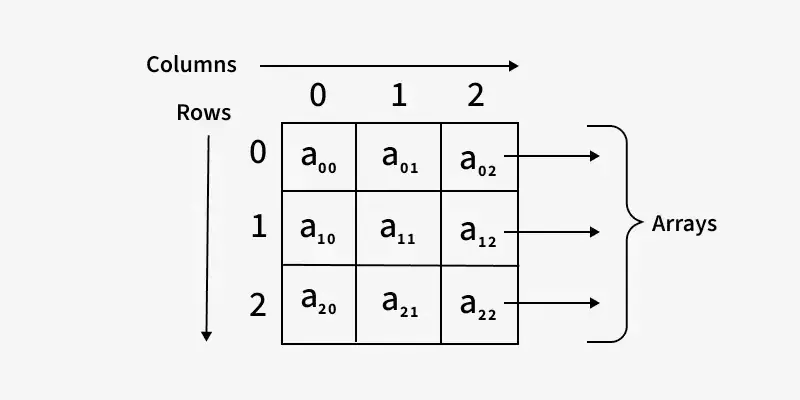
In fact, we can store any data type in an array - numbers, strings, booleans, objects, functions, even other arrays. Arrays are a very flexible data structure that can hold any kind of value. Arrays can also be made of arrays, creating a nested structure.
This is what we call a multi-dimensional array or nested array. To be a little more specific, this is a 2D array. And we can access the values in the nested array using their position, first the outer array, then the inner array:
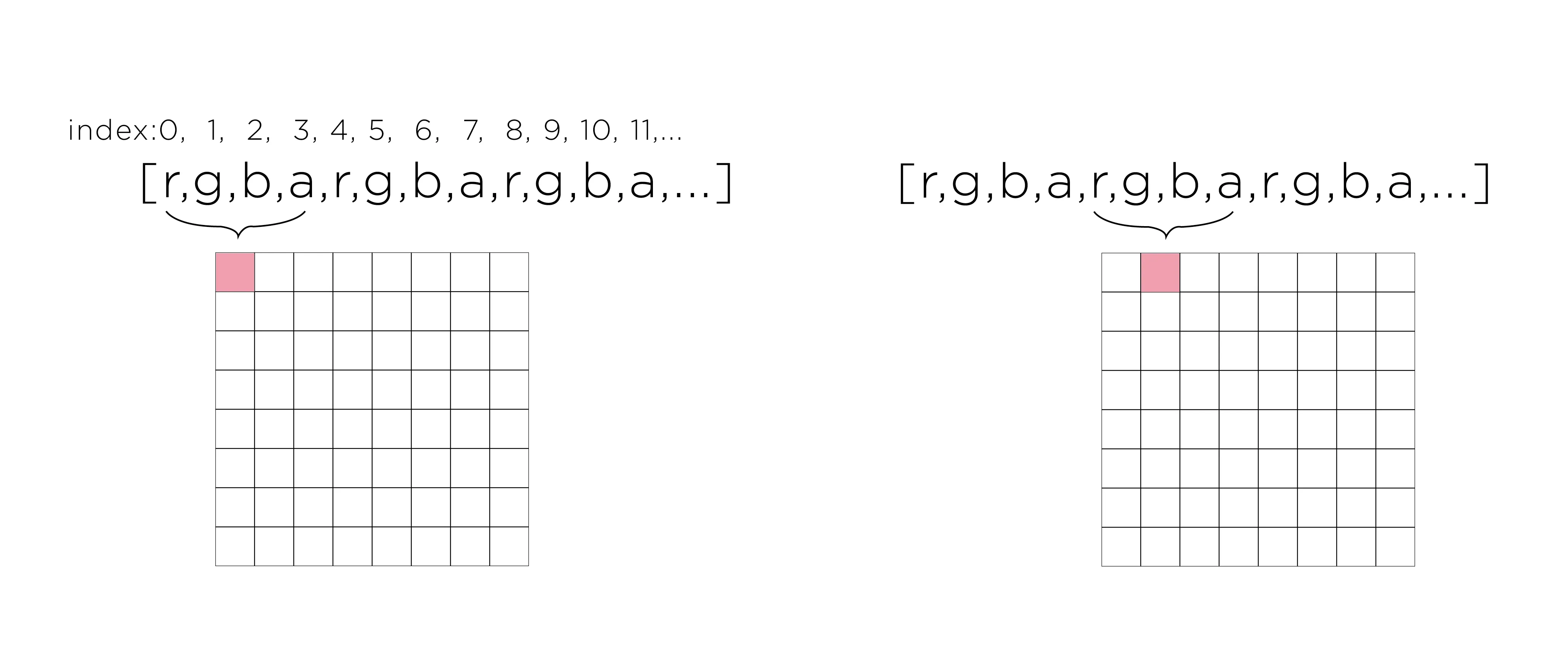
p5.js offers a function called loadPixels() that allows us to access the pixel data of an image or the canvas. When you call the function, p5.js populates a special array called pixels[] with the colour data of every pixel on the canvas or in an image.
Here’s the key concept: every pixel is represented by 4 numbers:
console.log("Total values in pixels[]:",pixels.length);
12
console.log("First pixel - Red:",pixels[0]);
13
console.log("First pixel - Green:",pixels[1]);
14
console.log("First pixel - Blue:",pixels[2]);
15
console.log("First pixel - Alpha:",pixels[3]);
16
}
Console
1
Totalvaluesinpixels[]:2560000
2
3
Firstpixel-Red:220
4
Firstpixel-Green:220
5
Firstpixel-Blue:220
6
Firstpixel-Alpha:255
This is the raw data. No abstraction, no interface, no convenience. Just numbers in a list. This is what Murtaugh means when he talks about the material reality of code - this is what’s actually there, underneath all the friendly function names.
To access a specific pixel at coordinates (x, y), we need to calculate its position in the array:
Formula: index = (y * width + x) * 4
Let’s break this down:
y * width tells us how many pixels come before this row
+ x adds the position within the row
* 4 because each pixel takes 4 values (R, G, B, A)
Here’s an example:
1
functionsetup() {
2
createCanvas(400,400);
3
background(220);
4
fill(255,0,0);
5
circle(200,200,100);
6
7
loadPixels();
8
9
// Get the colour of pixel at (200, 200)
10
let x = 200;
11
let y = 200;
12
let index = (y * width + x) * 4;
13
14
let r = pixels[index];
15
let g = pixels[index+1];
16
let b = pixels[index+2];
17
let a = pixels[index+3];
18
19
console.log(`Pixel at (${x}, ${y}):`,r,g,b,a);
20
}
This formula - (y * width + x) * 4 - is how two-dimensional space (the image) gets flattened into one-dimensional memory (the array). This is a fundamental operation in computing: mapping multi-dimensional structures onto linear memory. It’s not the only way to do it, but it’s become convention. And conventions, as we’ve seen, have consequences.
We can also write to the pixel array to change what’s displayed:
1
functionsetup() {
2
createCanvas(400,400);
3
background(220);
4
fill(255,0,0);
5
circle(200,200,100);
6
7
loadPixels();
8
9
// Invert all colours
10
for (let i = 0; i<pixels.length; i+=4) {
11
pixels[i] =255-pixels[i]; // invert red
12
pixels[i+1] =255-pixels[i+1]; // invert green
13
pixels[i+2] =255-pixels[i+2]; // invert blue
14
// alpha (i + 3) stays the same
15
}
16
17
updatePixels(); // Apply the changes to the canvas
18
}
We’re directly manipulating the pixel data. This is low-level, but it’s also powerful. We’re not limited to what p5.js provides - we can implement any pixel operation we can imagine.
Let’s look at the loop more carefully:
1
for (let i = 0; i<pixels.length; i+=4) {
2
// Process one pixel
3
}
We start at 0 and increment by 4 each time (i += 4). Why 4? Because each pixel takes 4 values. So i lands on:
0 (first pixel’s red)
4 (second pixel’s red)
8 (third pixel’s red)
etc.
Then we access the other channels:
pixels[i] is red
pixels[i + 1] is green
pixels[i + 2] is blue
pixels[i + 3] is alpha
This is Murtaugh’s point about repetition and learning: the first time you write this loop, you might not understand it. The second time, you start to see the pattern. By the tenth time, it’s in your fingers - you can type it without thinking. The repetition isn’t waste; it’s how the pattern becomes embodied knowledge.
The same technique works with images loaded from files:
1
let img;
2
3
functionpreload() {
4
img=loadImage('https://picsum.photos/400/300');
5
}
6
7
functionsetup() {
8
createCanvas(400,400);
9
10
// Load the image's pixels into its pixels[] array
11
img.loadPixels();
12
13
// Make it greyscale
14
for (let i = 0; i<img.pixels.length; i+=4) {
15
// Average the RGB values
16
let grey = (img.pixels[i] + img.pixels[i+1] + img.pixels[i+2]) / 3;
17
img.pixels[i] =grey;
18
img.pixels[i+1] =grey;
19
img.pixels[i+2] =grey;
20
}
21
22
// Update the image
23
img.updatePixels();
24
25
// Display it
26
image(img,0,0);
27
}
Now we’re operating on the image’s pixel data directly. We’ve bypassed all of p5’s image manipulation functions and gone straight to the data. We’ve broken the abstraction.
Notice what we’re doing here: taking colour (which we experience as red, green, blue) and reducing it to a single number (grey). This is a lossy transformation - information is destroyed. The formula we use (average of RGB) is just one way to convert to greyscale. There are others (weighted averages, luminance calculations). Each produces different results. Each encodes different assumptions about what “brightness” means.
This is what happens when you break abstraction - you see the arbitrary choices underneath. The formula isn’t natural or inevitable; it’s a decision someone made.
p5.js also has a handy createCapture() function that allows you to work with the webcam. You can use it to create a live feed of the webcam, or to capture a still image. In a way, video is just a series of images (or frames), and so we can treat it as such. So everything we’ve learned about images applies to video as well.
1
let video;
2
3
functionpreload() {
4
video=createCapture(VIDEO);
5
}
6
7
functionsetup() {
8
createCanvas(400,300);
9
video.hide();
10
}
11
12
functiondraw() {
13
image(video,0,0);
14
}
So we can update the previous code by replacing the image with the video feed:
1
let video;
2
3
functionsetup() {
4
createCanvas(400,400);
5
video=createCapture(VIDEO);
6
}
7
8
functiondraw() {
9
video.loadPixels();
10
11
for (let i = 0; i<video.pixels.length; i+=4) {
12
let grey = (video.pixels[i] + video.pixels[i+1] + video.pixels[i+2]) / 3;
When we access pixels directly, we can do things that aren’t possible through normal functions. We can corrupt images, glitch them, reveal their underlying structure.
Glitch art has a history. In the 1990s and 2000s, artists like Rosa Menkman, Phillip Stearns, and Kim Asendorf started deliberately corrupting digital images and videos to expose their underlying structure as data. This wasn’t just aesthetic experimentation - it was epistemological. As Menkman argues, glitches reveal how systems work by showing how they break. The glitch is a “moment/um” where the normally invisible becomes visible.
let shiftedIndex = (y * video.width + shiftedX) * 4;
25
26
// Store the red value we want at this position
27
newRedValues[index] =video.pixels[shiftedIndex];
28
}
29
}
30
31
// Second pass: apply new red values
32
for (let i = 0; i<video.pixels.length; i+=4) {
33
video.pixels[i] =newRedValues[i];
34
}
35
36
video.updatePixels();
37
image(video,0,0);
38
}
This creates a chromatic aberration effect - the red channel is shifted horizontally. This kind of glitch reveals the image as three separate colour channels, not a unified picture. You can see the structure underneath - the fact that colour is stored as separate R, G, B values, not as a unified experience.
This is what Menkman calls “vernacular of file formats” - understanding images by breaking them, by seeing their structure exposed. The glitch is pedagogical.
Let’s create another effect - converting to pure black and white based on brightness:
1
let img;
2
3
functionpreload() {
4
img=loadImage('https://picsum.photos/400/300');
5
}
6
7
functionsetup() {
8
createCanvas(400,300);
9
10
img.loadPixels();
11
12
let threshold = 128; // midpoint between 0 and 255
13
14
for (let i = 0; i<img.pixels.length; i+=4) {
15
// Calculate brightness
16
let brightness = (img.pixels[i] + img.pixels[i+1] + img.pixels[i+2]) / 3;
17
18
// If brighter than threshold, make white. Otherwise, black.
19
let newValue = 0;
20
if (brightness>threshold) {
21
newValue=255;
22
}
23
24
img.pixels[i] =newValue;
25
img.pixels[i+1] =newValue;
26
img.pixels[i+2] =newValue;
27
}
28
29
img.updatePixels();
30
image(img,0,0);
31
}
This creates a stark, high-contrast image. All the subtle gradations are gone - only black and white remain. This is a form of violence to the image, a reduction of complexity. But it’s also historically significant.
Early computer displays could only show black and white. Early image processing algorithms used thresholding because it was computationally cheap. What we’re doing here - this brutal binary reduction - is how images were first processed by computers. We’re recreating a historical constraint.
Posterisation reduces the number of colours in an image. With only 4 levels per channel, we get 4×4×4 = 64 possible colours instead of 256×256×256 = 16.7 million. This reveals how much information is usually hidden in smooth gradients.
Again, this has historical roots. Early computer displays and printers had limited colour palettes - 16 colours, 256 colours. Posterisation recreates this constraint. What looks like an aesthetic choice is actually revealing a material history of computing hardware.
We don’t even need to load images - we can create them pixel by pixel using just numbers and some maths.
1
functionsetup() {
2
createCanvas(400,400);
3
4
loadPixels();
5
6
// Creating a gradient
7
for (let y = 0; y<height; y++) {
8
for (let x = 0; x<width; x++) {
9
let index = (y * width + x) * 4;
10
11
// Red increases left to right
12
pixels[index] = (x/width) *255;
13
14
// Green increases top to bottom
15
pixels[index+1] = (y/height) *255;
16
17
// Blue is constant
18
pixels[index+2] =128;
19
20
// Alpha is opaque
21
pixels[index+3] =255;
22
}
23
}
24
25
updatePixels();
26
}
This creates an image mathematically. No photo, no file - just numbers generated by a formula. This is procedural image generation. No camera, no photographer, no subject. Just maths.
We can get more complex using p5’s noise() function:
1
functionsetup() {
2
createCanvas(400,400);
3
4
loadPixels();
5
6
// Create noise pattern
7
for (let y = 0; y<height; y++) {
8
for (let x = 0; x<width; x++) {
9
let index = (y * width + x) * 4;
10
11
// Use p5's noise function
12
let n = noise(x * 0.01,y * 0.01);
13
let grey = n * 255;
14
15
pixels[index] =grey;
16
pixels[index+1] =grey;
17
pixels[index+2] =grey;
18
pixels[index+3] =255;
19
}
20
}
21
22
updatePixels();
23
}
Or create animated interference patterns:
1
let time = 0;
2
3
functionsetup() {
4
createCanvas(400,400);
5
}
6
7
functiondraw() {
8
loadPixels();
9
10
for (let y = 0; y<height; y++) {
11
for (let x = 0; x<width; x++) {
12
let index = (y * width + x) * 4;
13
14
// Create interference pattern
15
let d1 = dist(x,y,width/3,height/2);
16
let d2 = dist(x,y,2*width/3,height/2);
17
18
let wave1 = sin(d1 * 0.05 - time);
19
let wave2 = sin(d2 * 0.05 - time);
20
21
let interference = (wave1 + wave2) / 2;
22
let brightness = map(interference, -1,1,0,255);
23
24
pixels[index] =brightness;
25
pixels[index+1] =brightness;
26
pixels[index+2] =brightness;
27
pixels[index+3] =255;
28
}
29
}
30
31
updatePixels();
32
time+=0.05;
33
}
This creates animated interference patterns - purely mathematical, purely procedural. No photographic source, just algorithms generating visual patterns. This is what John Whitney was doing in the 1960s with his analogue computers - using mathematics to generate moving images. What required specialised hardware then, we can now do with a few lines of JavaScript.
Now let’s bring it all together - write functions that operate on pixels. This is where we create our own abstractions.
1
let img;
2
3
functionpreload() {
4
img=loadImage('https://picsum.photos/400/300');
5
}
6
7
functionsetup() {
8
createCanvas(400,300);
9
invertImage(img); // use our function
10
image(img,0,0);
11
}
12
13
functioninvertImage(img) {
14
img.loadPixels();
15
16
for (let i = 0; i<img.pixels.length; i+=4) {
17
img.pixels[i] =255-img.pixels[i];
18
img.pixels[i+1] =255-img.pixels[i+1];
19
img.pixels[i+2] =255-img.pixels[i+2];
20
}
21
22
img.updatePixels();
23
}
Now invertImage() is a reusable function that inverts any image. We’ve created our own abstraction - a black box that does something useful. But unlike p5’s built-in functions, we wrote this one. We know what’s inside. We control what it hides.
This is the paradox Murtaugh identifies: we need abstraction (complexity is unmanageable without it), but we must also be able to break it (to understand, to modify, to learn). By writing our own functions, we’re on both sides - we’re abstracting for future use, but we also understand what’s being abstracted because we just wrote it.
The amount parameter makes this function flexible. Positive values brighten, negative values darken. We’ve exposed one aspect of the operation as controllable from outside.
But notice: we’ve made amount parametric, but not other things. We haven’t made the constrain range parametric. We haven’t made the operation itself parametric (what if we want to multiply instead of add?). These are choices. Each parameter we add makes the function more flexible but also more complex. Each parameter is another thing the caller needs to understand.
Højberg would ask: have we given enough clues? Is it obvious what amount means? What happens if you pass 1000? Or -1000? The function will work (thanks to constrain), but does the name suggest these boundaries?
This is building a processing pipeline - a sequence of transformations. Each function does one thing, and we combine them to create complex effects. This is modular abstraction - small pieces that can be rearranged.
This is DRY in action: instead of writing the invert code and the brightness code together every time, we write each once and combine them. But notice what we’ve lost: when you read invertImage(img); adjustBrightness(img, -30);, you don’t see the pixel loops, you don’t see the calculations. You have to trust that the functions do what their names say. You’ve traded explicitness for reusability.
Is this better? It depends. For someone who knows what these functions do, it’s cleaner. For someone trying to understand the code for the first time, it’s more opaque. Murtaugh would remind us: there’s value in seeing the repeated structure. Højberg would ask: do these function names give enough clues?
let pixelCount = img.pixels.length / 4; // Divide by 4 because each pixel is 4 values
26
27
for (let i = 0; i<img.pixels.length; i+=4) {
28
let r = img.pixels[i];
29
let g = img.pixels[i+1];
30
let b = img.pixels[i+2];
31
let brightness = (r + g + b) / 3;
32
totalBrightness+=brightness;
33
}
34
35
let averageBrightness = totalBrightness / pixelCount;
36
returnaverageBrightness;
37
}
This function analyses the image without modifying it. It calculates something and returns the result. We can use this information to make decisions about how to process the image.
Notice the naming: getAverageBrightness. The “get” prefix is a convention that suggests “this function returns a value without changing things”. But it’s just a convention - nothing enforces it. The function could secretly modify the image. This is what Højberg means about “low-context” code - you have to trust conventions, or read the implementation, or hope there’s documentation.
Let’s use this analysis function to make decisions:
1
let img;
2
3
functionpreload() {
4
img=loadImage('https://picsum.photos/400/300');
5
}
6
7
functionsetup() {
8
createCanvas(400,300);
9
10
// Auto-adjust brightness based on average
11
let avgBrightness = getAverageBrightness(img);
12
13
if (avgBrightness<100) {
14
// Image is dark, brighten it
15
adjustBrightness(img,50);
16
} elseif (avgBrightness>155) {
17
// Image is bright, darken it
18
adjustBrightness(img,-50);
19
}
20
21
image(img,0,0);
22
}
23
24
functiongetAverageBrightness(img) {
25
img.loadPixels();
26
let totalBrightness = 0;
27
let pixelCount = img.pixels.length / 4;
28
29
for (let i = 0; i<img.pixels.length; i+=4) {
30
let brightness = (img.pixels[i] + img.pixels[i+1] + img.pixels[i+2]) / 3;
Now we’re using one function to analyse and another to modify. We’re building a system where functions work together. This is composition - small functions combined to create larger behaviours.
But notice: we’re making aesthetic decisions (what counts as “too dark” or “too bright”) and encoding them in code. These thresholds - 100, 155 - are arbitrary. Different choices would produce different results. The code looks objective (“auto-adjust”) but it’s actually full of subjective judgments.
Now moving your mouse left and right changes the brightness in real-time. We’ve made the abstraction interactive. The function becomes an instrument - you can play with it, explore its parameter space, understand its behaviour through interaction rather than reading code.
This is a different kind of understanding. Instead of reading the implementation, you explore the possibility space. This is what Murtaugh means when he talks about the “quasi-ejaculatory nature” of finding the right abstraction - there’s a pleasure in discovering the behaviour through use, through repetition, through embodied interaction.
Now we have a glitch function that takes an intensity parameter. The glitch becomes an instrument we can play. Move your mouse and watch the image degrade in real-time. This is what Rosa Menkman calls “the glitch as a tool” - not just an accident or error, but a deliberate technique for revealing structure.
We started by learning to write functions - to create abstractions, to package code into reusable units. We saw how this is useful for organisation and reuse. But we also questioned it. We asked: what does abstraction hide? Whose labour? What assumptions? For whom are we optimising?
Then we looked at p5.js’s built-in functions for images - loadImage(), image(), tint(). These are convenient abstractions that hide technical complexity. But they also limit what we can do. They provide an interface, and every interface is a constraint. Every interface is a choice about what’s easy and what’s hard, what’s visible and what’s hidden.
So we broke the abstraction. We accessed the pixel data directly using loadPixels() and the pixels[] array. We learned about arrays - lists of values - as a way to understand how pixel data is stored. We manipulated images at the lowest level - individual colour values stored in a long list of numbers. We created glitches, corruptions, procedural patterns. We saw what’s underneath the clean interface.
And then - and this is important - we built our own abstractions on top of that. We wrote functions like invertImage() and adjustBrightness() that operate on pixels. We created our own interfaces, our own black boxes. But because we wrote them ourselves, because we understand what’s inside, these aren’t hostile abstractions. They’re not swamps. They’re paths we’ve built for ourselves (and maybe for others).
This is the dialectic Murtaugh and Højberg both point to: we need abstraction (complexity is unmanageable without it), but we must also be able to break it (to understand, to modify, to learn, to resist). Functions are tools of power - they determine what’s easy and what’s hard, what’s visible and what’s hidden, who can understand and who can’t. But we can write our own functions. We can create our own abstractions. We can decide what to hide and what to reveal. We can build high-context code instead of low-context swamps.
As you work with functions and images this week, consider:
Abstraction and access: When p5.js provides tint() as an abstraction, it makes tinting easy. But it also means you might never learn how colour multiplication works at the pixel level. Is convenience worth the loss of knowledge? Who benefits from your not knowing?
Repetition and skill: Murtaugh argues that repetition is how we develop craft. When you write the same pixel-manipulation loop three times, four times, ten times - does it become easier? Does it get into your fingers? Is the repetition waste, or is it learning?
Context and clarity: Højberg argues that code should be written for the next programmer. When you write a function, are you giving enough clues? Or are you creating a swamp? What makes code “high-context”?
Naming and power: When you name a function normalise() or clean() or correct(), you’re making claims about what’s normal, clean, correct. Whose standards are you encoding? What alternatives might exist?
Images and bodies: If you’re manipulating images of people - faces, bodies - what are the ethics of algorithmic transformation? When facial recognition “normalises” faces for analysis, when beauty filters “enhance” features, when glitches corrupt representations - what’s at stake? Who has the right to transform images of others?
Efficiency and extraction: Functions promise efficiency - write once, use many times. But efficiency for whom? At what cost? When does optimisation become extraction? What would it mean to write “inefficient” code that prioritises understanding over speed?
Your sketch (link to p5.js web editor as usual, well-commented explaining your functions and what they do)
A reflection
You reflection should include your approach to glitching, what glitching means to you, or how you see glitching as a form of resistance, or experimentation. All while considering what functions mean to you? Is it abstraction, or obfuscation? Is it a way to hide, or reveal? Is it a way to control, or resist? Is it a way to understand, or to question?
Next week, we’ll explore events and interaction with sound using p5.sound. We’ll think about response, agency, listening, and being listened to. We’ll ask: who has agency in interactive systems? What does it mean for code to respond? How does sound make temporal interaction perceptible in new ways? What’s the difference between listening and being listened to?
But before we get there, really sit with functions. Feel how they shape your thinking. Notice what they make easy and what they make hard. Question every abstraction. Build your own. Write code for people, not just for computers. Think about how you can read your code out loud to others. How to perform code?
Functions are one of the most fundamental structures in programming - and in systems of power. Understanding them deeply means understanding something about legibility, access, control, and resistance. These aren’t abstract concepts. They’re how the world is organised, who gets to see what, who gets to do what, who gets to understand and who is kept in the dark.