Week 3 - Loops
Loops: Rituals and Repetition
Section titled “Loops: Rituals and Repetition”Welcome to Week 3. Over the past two weeks, we’ve been learning a language - not just the syntax of JavaScript and p5.js, but a way of thinking. We’ve learnt to declare things (variables), to make decisions (conditionals), to create containers for change (let and const). This week, we encounter one of the most fundamental and haunting structures in computation: the loop.
The loop is everywhere. It’s in the draw() function that runs 60 times per second. It’s in the algorithms that recommend your next video, your next song, your next purchase. It’s in the factory line, the daily commute, the scroll through social media feeds. The loop is the structure of automation, of efficiency, of control - but also of compulsion, exhaustion, and the violence of endless repetition.
Wolfgang Ernst, in his essay ”… Else Loop Forever”, writes about the loop as creating what he calls “microtemporality” - a time that exists at the level of computation, divorced from human experience of duration. The loop doesn’t experience time the way we do. It doesn’t get tired. It doesn’t remember yesterday or anticipate tomorrow. It just goes. This is what Ernst means by the “untimeliness” of media - media that operates in its own temporal register, creating rhythms and repetitions that don’t align with biological, social, or phenomenological time.
But the loop is also ritual. It’s the repeated gesture, the daily practice, the liturgical cycle. It’s meditation and mantra. It’s muscle memory and habit formation. So we must ask: what kind of repetition are we creating when we write loops? What temporal structures are we imposing? And whose time are we privileging - human time or machine time?
Repetition and Difference
Section titled “Repetition and Difference”Before we write a single loop, we need to understand what repetition is. In philosophy, Gilles Deleuze distinguishes between two kinds of repetition: mechanical repetition (the same thing over and over) and complex repetition (where each iteration produces difference). The factory assembly line is mechanical repetition. But natural cycles - seasons, tides, heartbeats - are complex repetition. Each iteration is similar but never identical.
Computing tends toward mechanical repetition. The loop executes the same instructions with perfect fidelity. But as we’ll see, even computational loops can produce difference - through accumulation, through error, through the introduction of variability.
The loop also raises questions about labour. Repetitive labour has historically been the domain of the working class, of women’s work, of enslaved labour. Automation promises to free us from this repetition - but it also extends it, makes it more intense, more total. The algorithm works 24/7. It never goes on strikes. It never organises. What are the politics of delegating repetition to machines? What tasks should a machine carry, and what tasks should human do?
Discussion Questions
Before we code anything, let’s think about:
-
What are the rituals in your life? What do you repeat daily, weekly, yearly? Which repetitions feel nourishing, which feel draining?
-
Think about algorithmic repetition - content recommendation loops, infinite scroll, autoplay. How do these loops shape your behaviour, your attention, your sense of time?
-
Ernst writes about loops creating “microtemporality”. Can you feel this in your experience of digital media? When does computational time align with human time, and when does it clash?
-
Deleuze says repetition always produces difference. But the computer loop repeats identically. Or does it? What changes even when the code stays the same?
-
What’s the difference between repetition as spiritual practice (meditation, prayer) and repetition as exploitation (factory work, content moderation)? Can computation help us understand this difference? Or is there a difference at all?
Essential reading:
- Wolfgang Ernst, ”… Else Loop Forever”: The Untimeliness of Media (2009)
Further references:
- Hito Steyerl, “In Defense of the Poor Image” (2009)
- Gilles Deleuze, Difference and Repetition (1968)
- Wendy Chun, Programmed Visions (2011) - particularly Chapter 1 on “Software, or the Persistence of Visual Knowledge”
Artists working with repetition and loops:
- John Whitney - computational cinema and permutations
- Vera Molnár - systematic variations and algorithmic constraints
- Ryoji Ikeda - data-driven audiovisual loops
- Lauren McCarthy - social automation and repetitive labour (also the creator of p5.js)
Workshop Part I: The Mechanics of Repetition
Section titled “Workshop Part I: The Mechanics of Repetition”The for Loop: Counting as Control
Section titled “The for Loop: Counting as Control”Let’s return to something we learnt last week. Remember variables? Remember how we could store a value and use it?
let circleX = 200;let circleY = 200;let circleSize = 50;
function setup() { createCanvas(400, 400); background(220); circle(circleX, circleY, circleSize);}Now, what if we want to draw not one circle, but ten circles in a row? We could write:
function setup() { createCanvas(400, 400); background(220); circle(40, 200, 30); circle(80, 200, 30); circle(120, 200, 30); circle(160, 200, 30); circle(200, 200, 30); circle(240, 200, 30); circle(280, 200, 30); circle(320, 200, 30); circle(360, 200, 30); circle(400, 200, 30);}This is tedious. It’s also brittle - if we want to change the spacing or size, we need to change every line. But more importantly, this approach makes visible something we usually hide: the labour of repetition. We feel the repetition as we type the same thing over and over. The code enacts the exhaustion it produces.
Now let’s use a loop:
function setup() { createCanvas(400, 400); background(220);
for (let i = 0; i < 10; i++) { circle(40 + i * 40, 200, 30); }}This is more than convenience. It’s a different logic. Let’s dissect the syntax of the for loop:
for (let i = 0; i < 10; i++) { // code to repeat}Three parts, separated by semicolons:
-
Initialisation:
let i = 0- We create a variable calledi(by convention, short for “iterator” or “index”) and set it to 0. This happens once, at the start. (We can also name this anything we want, likecounterorindex, butiis convention. ) -
Condition:
i < 10- Before each iteration, we check: is i still less than 10? If yes, continue. If no, stop. -
Increment:
i++- After each iteration, add 1 to i. Remember from last week?i++is shorthand fori = i + 1.
So the loop runs 10 times. First iteration: i = 0. Second: i = 1. Third: i = 2. And so on until i = 9. When i becomes 10, the condition i < 10 is false, and we exit the loop.
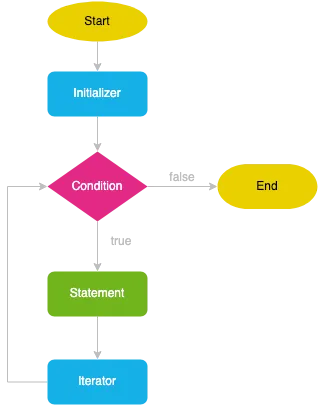
for loop flow. From the Javascript TutorialThe Loop Variable as Generator
Section titled “The Loop Variable as Generator”The loop variable i isn’t just counting. It’s a parameter that generates variation within repetition. Look at this line:
circle(40 + i * 40, 200, 30);Each time through the loop, i has a different value, so the x position is different:
- i = 0: x = 40 + 0 × 40 = 40
- i = 1: x = 40 + 1 × 40 = 80
- i = 2: x = 40 + 2 × 40 = 120
- …
We’re using multiplication to space the circles evenly. But we could use any mathematical relationship. The loop variable becomes a way to generate ordered difference.
Let’s use what we learnt last week - let’s make the variable, but use it within the loop:
function setup() { createCanvas(400, 400); background(220); let spacing = 40;
for (let i = 0; i < 10; i++) { // value of i keeps changing - starting from 0, until 9 let x = spacing + i * spacing; circle(x, 200, 30); }}Now spacing is a variable that controls the distribution. Change it once, and all the circles adjust. This is the power of abstraction - one change propagates through the entire system.
Loops Controlling Properties: Building on Conditionals
Section titled “Loops Controlling Properties: Building on Conditionals”Remember conditionals from last week? if statements that made decisions? We can combine loops with conditionals to create more complex behaviour:
function setup() { createCanvas(400, 400); background(220);
for (let i = 0; i < 10; i++) { let x = 40 + i * 40;
// Use conditional to alternate colours if (i % 2 == 0) { fill(255, 0, 0); // even: red } else { fill(0, 0, 255); // odd: blue }
circle(x, 200, 30); }}Here we use modulo (%) - which we’ll explore more deeply soon - to check if i is even or odd. Even-indexed circles are red, odd are blue. The loop creates the structure, the conditional creates the variation.
We can also use the loop variable directly to control visual properties:
function setup() { createCanvas(400, 400); background(220);
for (let i = 0; i < 10; i++) { let x = 40 + i * 40; let size = 10 + i * 5; // each circle gets bigger let grayValue = i * 25; // each circle gets darker
fill(grayValue); circle(x, 200, size); }}Each circle is different, but the difference is systematic, parametric. This is what Vera Molnár calls “systematic variation” - allowing parameters to vary within a rule-based system. The computer becomes an instrument for exploring structured difference.
Loops and Scale: The Question of Quantity
Section titled “Loops and Scale: The Question of Quantity”How many iterations is too many? Let’s increase our loop:
function setup() { createCanvas(400, 400); background(220);
for (let i = 0; i < 100; i++) { let x = 4 + i * 4; circle(x, 200, 3); }}One hundred circles. Now they’re packed tighter. The individual dissolves into the mass. This is a question of scale - at what point does quantity change quality?
Let’s go further:
function setup() { createCanvas(400, 400); background(220);
for (let i = 0; i < 10000; i++) { let x = random(width); let y = random(height); point(x, y); }}Ten thousand points scattered randomly. The canvas fills with noise. Individual points become texture. This is the power of the loop - to produce quantity that would be impossible manually.
Pause for reflection: Run the sketch above. Then run it again. And again. Each time, a different pattern of ten thousand points. The computer repeats the process identically, but the result differs (because we used random()). Is this mechanical repetition or complex repetition? Does the computer “remember” the previous runs?
Loops and Memory: What Persists?
Section titled “Loops and Memory: What Persists?”Here’s something crucial: variables declared inside a loop only exist inside that loop. They’re created and destroyed with each iteration.
function setup() { createCanvas(400, 400); background(220);
for (let i = 0; i < 10; i++) { let x = 40 + i * 40; // x is created circle(x, 200, 30); // x is used } // x is destroyed
// x doesn't exist here!}Each iteration is isolated. The loop doesn’t remember what happened before. But we can create memory by declaring variables outside the loop:
function setup() { createCanvas(400, 400); background(220); let cumulativeSize = 10;
for (let i = 0; i < 10; i++) { let x = 40 + i * 40; circle(x, 200, cumulativeSize); cumulativeSize += 5; // accumulates across iterations }}Now each iteration affects the next. We have accumulation, history, consequence. This is how loops can produce complex temporal structures - by maintaining state across iterations.
Workshop Part II: Time, Recursion, and the while Loop
Section titled “Workshop Part II: Time, Recursion, and the while Loop”The while Loop: Repetition Until
Section titled “The while Loop: Repetition Until”The for loop is about counting - we know in advance how many times to repeat. But what if we don’t? What if we want to keep going until some condition is met?
This is the while loop:
function setup() { createCanvas(400, 400); background(220);
let x = 20; while (x < width) { circle(x, 200, 30); x += 40; }}This says: “While x is less than the width of the canvas, draw a circle and add 40 to x.” It continues until x exceeds the canvas boundary. We don’t need to know how many circles that will be - it depends on the canvas width.
The while loop is more existential than the for loop. It’s not “how many times?” but “until when?” It’s waiting for a condition, not counting iterations.
The Danger of Forever
Section titled “The Danger of Forever”But be very careful:
let x = 0;while (x < 10) { circle(x * 40, 200, 30); // We forgot to change x!}If we forget to modify the condition variable (x in this case), the loop never ends. It runs forever. This is the infinite loop - the computer stuck in eternal repetition. Your sketch freezes. The browser hangs. This is “else loop forever” made literal.
The infinite loop reveals something about computation: it will obey us exactly. If we tell it to loop forever, it will try. It has no self-preservation, no boredom, no exhaustion. It just executes.
Interestingly, the draw() function in p5.js is an infinite loop. It runs forever (or until we call noLoop()). We’ve been working inside an infinite loop this whole time.
frameCount: The Automatic Temporal Counter
Section titled “frameCount: The Automatic Temporal Counter”Speaking of draw(), remember that it runs continuously, about 60 times per second? p5.js gives us a variable that counts these iterations: frameCount.
function setup() { createCanvas(400, 400);}
function draw() { background(220); text("Frame: " + frameCount, 10, 20);}Run this. Watch the numbers increase. This is computational time made visible - a counter that never stops, that marks each iteration of the draw loop.
frameCount starts at 0 and increments by 1 each frame. It’s automatic. We didn’t declare it. It’s built into p5.js - a gift and an imposition. The framework assumes we want to count time this way.
Let’s use frameCount to create animation by combining it with what we learnt in Week 2 - variables:
function setup() { createCanvas(400, 400);}
function draw() { background(220);
let x = frameCount % width; // we'll explain % properly soon let y = 200; circle(x, y, 50);}The circle moves across the screen. But how? frameCount increases each frame, so the x position increases. When it reaches the width, the % operator wraps it back to 0. The circle loops forever.
This is Ernst’s microtemporality - time measured in frames, in computational cycles, not in seconds or heartbeats or seasonal changes.
Workshop Part III: Modulo and the Production of Pattern
Section titled “Workshop Part III: Modulo and the Production of Pattern”The Modulo Operator: Cyclical Logic
Section titled “The Modulo Operator: Cyclical Logic”Let’s properly understand % - the modulo operator. It’s one of the most important operators for creating temporal and spatial patterns in code.
Modulo gives us the remainder after division:
10 % 3 // equals 1 (10 ÷ 3 = 3 remainder 1)15 % 4 // equals 3 (15 ÷ 4 = 3 remainder 3)20 % 5 // equals 0 (20 ÷ 5 = 4 remainder 0)But why is this useful? Because it creates cycles. When we use modulo with a constant, values wrap around:
0 % 10 = 01 % 10 = 12 % 10 = 2...9 % 10 = 910 % 10 = 0 // wraps back to 011 % 10 = 112 % 10 = 2The sequence goes from 0 to 9, then back to 0, then to 9, forever. This is perfect for creating periodicity - things that repeat at regular intervals.
Modulo for Spatial Patterns
Section titled “Modulo for Spatial Patterns”Let’s combine modulo with a loop:
function setup() { createCanvas(400, 400); background(220);
for (let i = 0; i < 20; i++) { let x = 40 + i * 40;
if (i % 2 == 0) { fill(255, 0, 0); } else { fill(0, 0, 255); }
circle(x, 200, 30); }}When i % 2 == 0, i is even. When it’s not, i is odd. So we alternate: red, blue, red, blue. The modulo creates a binary rhythm.
This is the example we looked at earlier.
Now we cycle through three colours: red, green, blue, red, green, blue. The modulo creates a ternary rhythm.
Modulo for Temporal Patterns
Section titled “Modulo for Temporal Patterns”Where modulo becomes really powerful is in controlling time - when things happen:
function setup() { createCanvas(400, 400);}
function draw() { background(220);
// Only draw every 30th frame if (frameCount % 30 == 0) { let x = random(width); let y = random(height); circle(x, y, 50); }}Now a new circle appears every 30 frames - twice per second at 60fps. The modulo creates a rhythm, a pulse. It gates the flow of time.
Let’s make something more complex by building on our variable knowledge:
let lastCircleFrame = 0;let interval = 30;
function setup() { createCanvas(400, 400);}
function draw() { background(220, 220, 220, 10); // transparent for trails
if (frameCount % interval == 0) { let x = random(width); let y = random(height); let size = random(20, 60); fill(random(255), random(255), random(255), 150); circle(x, y, size); }}Circles appear at regular intervals, but their properties (position, size, colour) are random. We have periodic structure with stochastic content. Order and chaos.
Modulo and the Politics of Rhythm
Section titled “Modulo and the Politics of Rhythm”But let’s think critically about what modulo represents. It’s mechanical periodicity - perfect, unwavering, without drift. Natural rhythms aren’t like this. Your heartbeat varies. Seasons aren’t exactly equal. The modulo operator imposes a kind of temporal tyranny - a metronomic regularity that doesn’t exist in biological or social time.
The cultural theorist Paul Gilroy writes about the “politics of rhythm” in Black Atlantic - how syncopation, polyrhythm, and swing resist the mechanical time of industrial capitalism. The straight beat of modulo is factory time, clock time, Taylorist time. What would it mean to create rhythms that resist this?
We can introduce variation:
let nextCircleFrame = 30;
function setup() { createCanvas(400, 400);}
function draw() { background(220, 220, 220, 10);
if (frameCount >= nextCircleFrame) { circle(random(width), random(height), 50); nextCircleFrame = frameCount + random(20, 40); // variable interval }}Now the interval varies between 20 and 40 frames. The rhythm wobbles. It breathes. It’s more alive.
Workshop Part IV: Nested Loops and Spatial Logic
Section titled “Workshop Part IV: Nested Loops and Spatial Logic”The Grid: Two-Dimensional Repetition
Section titled “The Grid: Two-Dimensional Repetition”So far, our loops have been one-dimensional - a line of shapes. But what if we want to fill the entire canvas? We need to repeat in two dimensions: x and y. This requires nested loops - a loop inside a loop.
function setup() { createCanvas(400, 400); background(220);
for (let x = 0; x < 10; x++) { for (let y = 0; y < 10; y++) { circle(20 + x * 40, 20 + y * 40, 30); } }}Let’s understand what’s happening. The outer loop runs 10 times (x from 0 to 9). But for each iteration of the outer loop, the inner loop runs 10 times (y from 0 to 9). So the code inside the inner loop runs 10 × 10 = 100 times.
Think of it like reading a page: you go across a line (inner loop), then move down to the next line (outer loop) and go across again. The nested loop is the structure of the grid.
We’ve created a 10×10 grid of circles. But notice: we could change those numbers to create any size grid. Let’s use variables:
function setup() { createCanvas(400, 400); background(220); let cols = 10; let rows = 10; let spacing = width / cols;
for (let x = 0; x < cols; x++) { for (let y = 0; y < rows; y++) { circle(spacing/2 + x * spacing, spacing/2 + y * spacing, spacing * 0.7); } }}Now if we change cols or rows, the grid adapts. We’ve created a parametric system.
The Grid as Ideology
Section titled “The Grid as Ideology”But let’s pause. What is a grid? It’s a way of organising space - dividing it into regular, rectangular units. The grid is everywhere in computation: pixels on a screen, cells in a spreadsheet, tiles on a map, nodes in a network.
The art historian Rosalind Krauss writes about the grid as “the form that is ubiquitous in the art of our century” - a structure that promises order, rationality, and control. But the grid is also a tool of power: the colonial grid imposed on indigenous land, the prison grid of Foucault’s panopticon, the data grid of surveillance capitalism.
When we create a nested loop, we’re creating a grid. We’re imposing this particular spatial logic. What other logics might we imagine? What would a non-grid spatial structure look like in code?
Making Grids Interesting: Position as Parameter
Section titled “Making Grids Interesting: Position as Parameter”The grid becomes interesting when we use position to generate difference:
function setup() { createCanvas(400, 400); background(220);
for (let x = 0; x < 10; x++) { for (let y = 0; y < 10; y++) { let size = (x + y) * 3; // size depends on position let gray = (x + y) * 12; // colour depends on position fill(gray); circle(20 + x * 40, 20 + y * 40, size); } }}Now each circle’s size and colour are determined by its position in the grid. We have a gradient, a field of variation. The grid generates its own logic.
Let’s get more complex, combining everything we’ve learnt:
function setup() { createCanvas(400, 400); background(220);
for (let x = 0; x < 10; x++) { for (let y = 0; y < 10; y++) { // Different drawing based on position if ((x + y) % 2 == 0) { fill(255, 0, 0); circle(20 + x * 40, 20 + y * 40, 30); } else { fill(0, 0, 255); rect(5 + x * 40, 5 + y * 40, 30, 30); } } }}Now we have a checkerboard pattern - circles and squares alternating. We’re using modulo, conditionals, and nested loops together.
Computational Complexity: The Cost of Nesting
Section titled “Computational Complexity: The Cost of Nesting”Here’s something crucial we need to discuss: nested loops are expensive. Let’s think about what happens as we increase the grid size:
- 10×10 grid = 100 circles
- 100×100 grid = 10,000 circles
- 1000×1000 grid = 1,000,000 circles
Each time we add a zero to the dimensions, we add two zeros to the number of operations. This is quadratic complexity - the cost grows exponentially.
Try this:
function setup() { createCanvas(400, 400); background(220);
for (let x = 0; x < 1000; x++) { for (let y = 0; y < 1000; y++) { point(x * 0.4, y * 0.4); } }}Watch how long it takes. Your sketch might freeze. We’ve hit a computational limit.
This isn’t just a technical issue - it’s material and ecological. Each iteration consumes CPU cycles, which consume electricity, which consume fossil fuels (unless you’re on renewable energy). The nested loop has a carbon footprint.
What are the ethics of computational excess? When does our code become extractive? These are questions software studies asks us to consider.
Workshop Part V: Loops, Time, and Degradation
Section titled “Workshop Part V: Loops, Time, and Degradation”Loops in draw(): Accumulation and Exhaustion
Section titled “Loops in draw(): Accumulation and Exhaustion”Now let’s combine loops with the draw() function - the automatic loop that runs 60 times per second. What happens when loops nest inside loops inside time?
function setup() { createCanvas(400, 400); background(220);}
function draw() { // Draw 10 random circles each frame for (let i = 0; i < 10; i++) { let x = random(width); let y = random(height); fill(random(255), random(255), random(255), 50); circle(x, y, 20); }}Run this. Watch what happens. Each frame, 10 new circles appear. They accumulate. The canvas becomes denser and denser. Eventually, it’s just noise - a saturated field where individual marks disappear into texture.
This is what happens when repetition continues beyond its productive limit. Accumulation becomes excess. Pattern becomes noise. The loop exhausts itself.
Let’s make this more explicit:
let density = 0;
function setup() { createCanvas(400, 400);}
function draw() { background(220);
// Number of circles increases over time for (let i = 0; i < density; i++) { circle(random(width), random(height), 10); }
density += 0.5;
// Stop at exhaustion if (density > 1000) { noLoop(); }}Watch the canvas fill. At first, sparse marks. Then more. Then too many. Then incomprehensible. The loop reveals its own limit.
Loops and Error: Degradation as Aesthetic
Section titled “Loops and Error: Degradation as Aesthetic”What if instead of clean accumulation, we introduce error? What if the loop degrades itself?
let errorAmount = 0;
function setup() { createCanvas(400, 400);}
function draw() { background(220, 220, 220, 30); // slightly transparent for trails
// Draw multiple circles with increasing error for (let i = 0; i < 20; i++) { // Position follows mouse but with accumulated noise let noiseX = random(-errorAmount, errorAmount); let noiseY = random(-errorAmount, errorAmount); let noisySize = 30 + random(-errorAmount/2, errorAmount/2);
// Vary alpha based on loop iteration let alpha = 255 - (i * 10);
fill(255, 0, 0, alpha); circle(mouseX + noiseX, mouseY + noiseY, noisySize); }
// Error increases slowly over time errorAmount += 0.02;
// Reset at threshold if (errorAmount > 20) { errorAmount = 0; }
// Display error amount fill(0); text("Error: " + errorAmount.toFixed(2), 10, 20);}Move your mouse around. Watch as what should be a clean circle becomes increasingly corrupted. The positions drift. The sizes vary. What was precise becomes noisy. The loop doesn’t just repeat - it degrades over time.
This is Steyerl’s “poor image” made interactive - an image that deteriorates through circulation, through repetition, through the violence of computational processing.
Loops and Exhaustion: When to Stop
Section titled “Loops and Exhaustion: When to Stop”One of the most profound questions about loops is: when do they end? The for loop has a built-in exit condition. The while loop exits when its condition fails. But the draw() loop runs forever - unless we explicitly stop it.
function draw() { // ... drawing code ...
if (someCondition) { noLoop(); // stop the draw loop }}But what should someCondition be? When is enough? This isn’t just a technical question.
Let’s create a sketch that exhausts itself:
let energy = 100;let decay = 0.1;
function setup() { createCanvas(400, 400);}
function draw() { background(0, 0, 0, 20); // dark trails
// Only draw while we have energy if (energy > 0) { // Draw multiple particles in a burst let burstSize = floor(energy / 10); // fewer particles as energy depletes
for (let i = 0; i < burstSize; i++) { let angle = random(TWO_PI); let distance = random(50); let x = width/2 + cos(angle) * distance; let y = height/2 + sin(angle) * distance;
// Fade based on remaining energy let alpha = energy * 2.55; fill(255, 255, 255, alpha); circle(x, y, 5); }
// Deplete energy energy -= decay; }
// Display energy fill(255); text("Energy: " + energy.toFixed(1), 10, 20);
// Stop when exhausted if (energy <= 0) { fill(255); textAlign(CENTER, CENTER); textSize(32); text("EXHAUSTED", width/2, height/2); noLoop(); }}Run this. Watch the system slowly exhaust its energy. The bursts become smaller and sparser. Eventually, the energy reaches zero and the system stops. This is repetition with consequence - the loop uses itself up. Don’t worry about the cos and sin for now, we’ll get to them later.
This relates to what Wendy Chun calls “the enduring ephemeral” in digital media. We think of computation as infinite, tireless. But everything has limits. Energy, memory, attention. The loop that seems endless always ends somewhere.
Workshop Part VI: Breaking and Continuing - Control Flow
Section titled “Workshop Part VI: Breaking and Continuing - Control Flow”break: Interrupting the Loop
Section titled “break: Interrupting the Loop”Sometimes we need to exit a loop early. The break statement stops the loop immediately:
function setup() { createCanvas(400, 400); background(220);
for (let i = 0; i < 100; i++) { if (random() < 0.05) { break; // 5% chance to stop each iteration } circle(20 + i * 4, 200, 10); }}Run this multiple times. Sometimes you get a long line of circles, sometimes short. The break introduces indeterminacy - a random interruption of the automatic flow.
This is interesting theoretically. The loop wants to continue - it’s programmed to go from 0 to 99. But break is an assertion of control, an intervention. It’s like a worker refusing to continue, a machine breaking down, a system hitting its limit.
We can also use break with conditions we learnt last week:
function setup() { createCanvas(400, 400); background(220); let currentX = 0;
for (let i = 0; i < 100; i++) { let size = random(10, 30);
// Stop if next circle would go off edge if (currentX + size > width) { break; }
circle(currentX + size/2, 200, size); currentX += size; }}Now we draw circles until they would go off the edge. The loop doesn’t complete its planned iterations - it stops when it encounters a spatial limit. Form constrains process.
continue: Skipping Iterations
Section titled “continue: Skipping Iterations”While break exits the loop entirely, continue skips the current iteration and moves to the next:
function setup() { createCanvas(400, 400); background(220);
for (let i = 0; i < 50; i++) { if (i % 5 == 0) { continue; // skip every 5th circle } circle(20 + i * 8, 200, 10); }}Every fifth position is empty. The loop continues but selectively executes. This creates gaps, absences, negative space within the repetition.
continue is interesting theoretically because it’s about refusal within compliance. The loop keeps going (it doesn’t break), but it refuses to execute certain iterations. It’s like a form of selective strike - showing up but not producing.
Let’s use continue with more complex conditions:
function setup() { createCanvas(400, 400); background(220);
for (let i = 0; i < 100; i++) { let x = i * 4;
// Skip if in certain zones if (x > 150 && x < 250) { continue; }
let size = 10 + (i % 10); fill(i * 2.5, 100, 255 - i * 2.5); circle(x, 200, size); }}Now there’s a void in the middle - a zone where the loop refuses to draw. The structure continues but production stops. This is how we can create structured absence within repetition.
Workshop Part VII: Synthesis and Critical Making
Section titled “Workshop Part VII: Synthesis and Critical Making”Bringing It All Together
Section titled “Bringing It All Together”Let’s create something that combines everything we’ve learnt over three weeks: variables, conditionals, and loops. We’ll build a system that reveals the temporal and spatial structures of repetition:
let time = 0;let speed = 0.02;let corruption = 0;let corruptionRate = 0.01;
function setup() { createCanvas(400, 400);}
function draw() { background(0, 0, 0, 30);
// Nested loop for grid let cols = 8; let rows = 8; let spacing = width / cols;
for (let x = 0; x < cols; x++) { for (let y = 0; y < rows; y++) {
// Position with accumulating error let posX = spacing/2 + x * spacing + random(-corruption, corruption); let posY = spacing/2 + y * spacing + random(-corruption, corruption);
// Size oscillates with time, varies with position let sizeBase = sin(time + x * 0.5 + y * 0.5) * 10 + 15; let sizeFinal = sizeBase + random(-corruption/2, corruption/2);
// Colour depends on position and time let hue = (x + y + time * 10) % 255; let alpha = 200 - corruption * 5;
// Conditional: only draw if conditions met if (sizeFinal > 5 && alpha > 50) { fill(hue, 200, 255, alpha); circle(posX, posY, sizeFinal); } } }
// Time advances time += speed;
// Corruption accumulates corruption += corruptionRate;
// Reset when too corrupt if (corruption > 30) { corruption = 0; time = 0; }
// Display state fill(255); text("Time: " + time.toFixed(2), 10, 20); text("Corruption: " + corruption.toFixed(2), 10, 40);}Run this. Watch how the grid pulses with time, then gradually degrades. The nested loop creates spatial structure. The draw() loop creates temporal flow. Variables track state. Conditionals control what appears. And slowly, everything corrupts until it resets.
This is a system that reveals its own mechanisms. You can see the loop structure (the grid). You can see time passing (the oscillation). You can see degradation accumulating (the increasing noise). The code doesn’t hide its logic - it performs it.
Reflection: The Ethics and Aesthetics of Repetition
Section titled “Reflection: The Ethics and Aesthetics of Repetition”Let’s step back from the code and think about what we’ve been doing.
When we write a loop, we’re creating a machine for producing repetition. But repetition is never neutral. As we’ve seen, it can:
- Produce abundance (a grid full of shapes)
- Create pattern (modulo-driven rhythms)
- Generate variation (parametric difference within sameness)
- Accumulate excess (saturation and noise)
- Degrade through time (error and corruption)
- Exhaust itself (systems that run out)
These aren’t just aesthetic choices - they’re political and ethical ones. When Amazon’s algorithm loops through worker metrics to determine bathroom breaks, that’s a loop. When social media loops through posts to determine what keeps you scrolling, that’s a loop. When surveillance systems loop through faces to identify suspects, that’s a loop.
The loop is never “just” technical. It’s always enacting some logic of control, efficiency, categorisation, or extraction.
Questions to Sit With
Section titled “Questions to Sit With”As you work with loops this week, I want you to sit with these questions:
-
Whose time? When you create a loop, whose temporal experience are you privileging? The computer’s perfect rhythm, or human variation? How might you create loops that feel more alive, more organic, more human?
-
When to stop? We’ve seen loops that never stop, loops that stop at arbitrary numbers, loops that exhaust themselves. What determines when enough is enough? Is it aesthetic? Computational? Ethical?
-
The violence of efficiency. Loops are about doing things efficiently - many operations quickly. But efficiency is never neutral. Factory efficiency meant worker exploitation. Algorithmic efficiency means gig workers monitored by the millisecond. When does efficiency become violence?
-
Pattern and control. The nested loop creates grids - ordered, regular, controlled space. But the grid is also a colonial structure, a prison structure, a surveillance structure. What would it mean to create loops that don’t impose grid logic? Are there other ways to organise space through repetition?
-
Degradation as resistance. We created loops that degrade, that corrupt, that fail. In a world that demands perfect repetition, perfect productivity, perfect uptime - what does it mean to create systems that deliberately fail? Is failure a form of resistance?
-
The loop as ritual. Not all repetition is oppressive. There’s also ritual repetition - prayer, meditation, practice. Can we create loops that feel more like ritual than like factory work? What’s the difference?
Artist and Cultural References
Section titled “Artist and Cultural References”To deepen your thinking about loops, repetition, and time, explore these artists and theorists:
Artists:
- Vera Molnár - Pioneer of algorithmic art, explores “one percent of difference” through systematic variation
- John Whitney - Created permutational films using early computers, visualising nested loops
- Ryoji Ikeda - Data-driven audiovisual work that makes computational processes perceptible
- Casey Reas - Co-creator of Processing, works with software structures as artistic material
- Rosa Menkman - Glitch art and the aesthetics of digital failure
- Zach Lieberman - Explores playful interaction and the poetry of code
Theorists and Texts:
- Wolfgang Ernst - ”… Else Loop Forever” (our essential reading)
- Wendy Chun - Programmed Visions, especially on the “enduring ephemeral”
- Paul Gilroy - The Black Atlantic, on the politics of rhythm and time
- Hito Steyerl - “In Defense of the Poor Image” on circulation and degradation
- Gilles Deleuze - Difference and Repetition on mechanical vs complex repetition
- Mark Fisher - Ghosts of My Life, on cultural repetition and hauntology
Weekly Task #3
Section titled “Weekly Task #3”In Dialogue with Vera Molnár
Choose one work by Vera Molnár and create your own sketch “in dialogue” with it. This isn’t recreation or copying - it’s a conversation. Study her systematic approach, her “one percent of difference”, her use of constraints and variation within loops. Then create something that responds to, extends, questions, or reimagines her approach using what we’ve learned about loops.
Some works to consider, although you are not limited to these:
- (Des)Ordres (1974)
- Interruptions (1968-69)
- Carrés (Squares series)
- Lettres de ma mère (Letters from my Mother, 1981-90)
Your sketch should:
- Clearly reference which Molnár work you’re engaging with
- Use loops to create systematic variation
- Demonstrate your own artistic/conceptual concerns
- Show technical competence with the week’s concepts
What to Submit
Section titled “What to Submit”- Your sketch (link to p5.js web editor)
- A reflection (300-350 words) addressing:
- Which Molnár work are you engaging with and why?
- How does your sketch respond to or extend her approach?
- What did you learn about systematic variation through this process?
- How does working with loops change your understanding of her practice?
- What constraints did you impose on yourself, and how did they shape what emerged? When did the constraints feel generative vs restrictive?
- Molnár often spoke about the computer as a tool for exploring variations she couldn’t manually produce. What variations did the loop enable that would be impossible by hand? What was lost in the translation to code?
- How does your work differ from Molnár’s in terms of temporality? Her work was often static prints - yours executes in time. How does the draw() loop change the nature of systematic variation?
Here is a video interview with Vera Molnár where she discusses her work and her approach you might find helpful.
Looking Ahead
Section titled “Looking Ahead”Next week, we’ll move from loops to functions - from repetition to abstraction, from doing many things to naming and reusing processes. But before we get there, really sit with loops. Feel their rhythm. Notice when they become oppressive, when they become meditative, when they break down.
The loop is one of the most fundamental structures in computing - and in life. Understanding it deeply means understanding something about time, labour, automation, and control. These aren’t abstract concepts. They’re material, political, lived realities.
See you next week.